文章列表
2026/8/11大约 2 分钟
文章列表
文章列表是主页显示的所有可浏览的文章的列表。在个人简介中提供了文章列表分类。
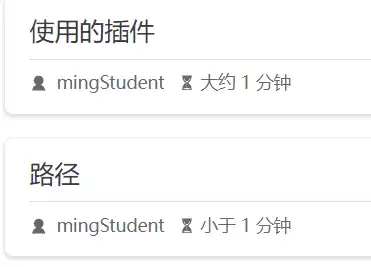
文章包含:标题、摘要、作者、阅读时间等信息
路径
在 /article/下存放文章列表页面
摘要
关闭自动生成摘要
默认启用了自动生成摘要
关闭自动生成摘要:
  plugins: {
    blog: {
		excerpt: true,
		excerptLength: 0
	},
	}
设置摘要
- 在正文中:
文章列表是。。。
<!-- more -->
正文
效果:
2. 在Frontmatter中设置
标题
在文章的Frontmatter 设置title属性。如果没有设置,那么默认为文章的首个h1 标签内容
隐藏文章
希望文章列表中不显示指定的文章
配置:
- 在文章的frontmatter中设置 atricle 属性为false;
- 在theme.ts中设置 plugins.blog.filter
- 类型:(page:page) => boolean, 获取页面信息,返回是否过滤当前页面
- 默认值:
({ frontmatter, filePathRelative}) =>
frontmatter.article ?? (Boolean(filePathRelative) && ! frontmatter.home)| 变量/表达式 | 说明 |
|---|---|
| frontmatter | 文档frontmatter(yaml配置) |
| filePathRelative | 文档的相对路径,应该是相对于src的 |
| frontmatter.article | 如果设置了article属性,则按照article的值确定是否过滤 |
| ?? | 未设置article |
| Boolean(filePathRelative) | 文档的路径正确 |
| && | 与逻辑运算 |
| !frontmatter.home | 文档不是主页 |
设置过滤掉 Yanki 文件夹
  plugins: {
    blog: {
		excerpt: true,
		excerptLength: 0,
		filter: ({ frontmatter, filePathRelative}) => {
			//1. 需要排除的文件夹
			const excludedDir = "Yanki";
			//2. 检查当前文档是否在该文件下(以Yanki 起始)
			const isExcluded = filePathRelative?.startsWith(excludedDir);
			if(isExcluded)
				return false;
			else
				return frontmatter.article ?? (Boolean(filePathRelative) && ! frontmatter.home)
			}
},问题:以上配置不好使
line 9 filePathRelative后的 ? 表示:如果调用后面函数的对象不存在,则返回 undefined,而不是 throw error
filePathRelative 还有许多为null所以需要 ? 避免报错
侧边栏中显示的文档名称为: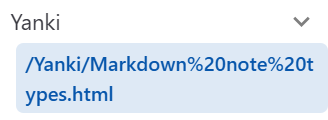
带有 / ,设置为 "/Yanki" 无法过滤掉
打印filePathRelative的值为:Yanki/Markdown note types.md,isExcluded的值是 true
但是文章仍然存在。该函数返回的结果对文章显示没有效果???
答:因为配置sidebar为structur-按结构自动生成,侧边栏中仍然会显示Yanki下的文档。
问题:文章列表中不显示,能否通过分类、标签找到该文章?
效果:

还是显示,为什么?
答:article的类型是 boolean 对应obsidian frontmatter 中的 Checkbox,这里article的类型是text,类型不符,所以页面未被隐藏