Markdown
Markdown
推荐的文档结构:
# 文档标题: 同文件名
作者
摘要
目录
## 标题1
### 标题1.1
## 标题2
.。。
这应该算是传统的markdown 文档结构,但是为了适应工具要求,比如hope主题 在fronmatter 中设置作者,摘要标签前所有信息均为摘要 等,可以适当调整结构。这里从2级标签开始划分文档,我之前都是从1级开始,1级前作为文档说明。
代码块
#include <iostream>

int main()
{
	int i;
	int i = 3;

	std::cout << "hello" << std::endl;
	int *p = new int(3);
	auto j = i / 0;
	//Word highlight
	Word

	//从这里开始折叠折叠

	auto func = []() {
		std::cout << "lambda";
	}

	return 0;

}``` cpp title="demo" :collapsed-lines = 17
#include <iostream>
int main()
{
int i; // [!code --]
int i = 3; // [!code ++]
std::cout << "hello" << std::endl; // [!code highlight]
int *p = new int(3); // [!code warning]
auto j = i / 0; // [!code error]
//Word highlight
Word
//从这里开始折叠折叠
auto func = []() {
std::cout << "lambda";
}
return 0;
}
```| 行号 | 功能 | 语法 | 配置属性 |
|---|---|---|---|
| 5、6 | 差异 | [!code --], [!code ++] | notationDiff |
| 8 | 行高亮 | [!code highlight] | notationHighlight |
| 9、10 | 错误标记 | [!code warning], [!code error] | notationErrorLevel |
| 12、13 | 字符高亮 | [!code word:Word] | notationWordHighlight |
| highlighter options | 折叠 | :collapsed-lines :no-collapsed-lines :collapsed-lines=17 //从17行开始换行 | collapsedLines |
| 标题 | ``` cpp title="demo" |
问题:
- 标题是不支持中文吗?;
- 标题设置总是报错:

我的原文: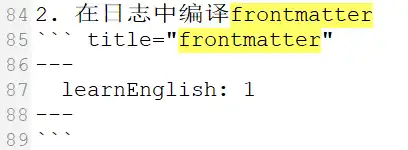
编译为html 失败的原因是我多打了\” ?
查看二进制文件信息
\“ 的值是0x22,0x0A 是换行,没有多打
搞不懂。。。
发现原因了
设置代码块的标题时需要指定语言
使用txt title="frontmatter" 编译输出正常;
使用 ``` title="frontmatter" 编译失败,
title 和前面的` 没有间隔,也会编译失败
。。。所以是obsidian 太强大了吗,在ob中都是正常的
配置:
hopetheme({
	//...
	markdown: {
		highlighter: {
			notationDiff: true,
			notationHighlight: true,
			notationErrorLevel: true,
			notationWordHighlight: true,
			notationFocus: true,
			collapsedLines: true,
		},
	},
)}
聚焦
console.log(`1`);
console.debug(`2`);
console.log(`3`);| 行号 | 功能 | 语法 | 配置属性 |
|---|---|---|---|
| 2 | 聚焦 | [!code focus] | notationFocus |
行折叠
- 什么时候会折叠?
1
2
3
4
5
6
7
8
9
10
11
12
13
14
15
当代码块行数大于等于15行时会出现折叠按钮
2. 能否配置启用折叠的默认行数?
似乎不行
3. :collapsed-lines的使用
1
2
3
:collapsed-lines
下面的内容会被折叠?
4
和我想的效果不一致。
默认情况下禁用,可以通过高亮器选项中的
collapsedLines启用。
如果没有配置 collapsedLines: true,默认是不会折叠的。
高亮器选项:``` 后,代码块语言、标题 配置行
。。。```txt :collapsed-lines 启用折叠
。。。
```- 如果想要折叠代码块中间位置的内容,或者 有多个区域需要折叠
按照我的想法
开头

中间部分
:collapsed-lines
5
6
7
:no-collapsed-lines

结尾
从collapsed ~ no-collapsed 之间的内容应该被折叠,显示为 。。。
当然实际是不行,只能分成多个代码块
GFM 警告
具有图标、背景颜色,用来突出显示信息的块
配置:
markdown: {
	...
	alert: true,
	...
},
示例:
note,vuepress 中除了提示标题,还需要有内容才会呈现效果,否则只会显示文字内容。obsidian中可以不包含内容直接显示标题。
[!note]
>[!note]支持的类型:
重要
important
相关信息
info
>[!info]
>info
提示
tip
注意
warning
警告
caution
问:不支持quote,该如何添加支持类型?
每行都要以 > 开始,否则内容不会被包围
注意
必须以>起始
ob中能够正常显示
每行都要以 > 开始,否则内容不会被包围
>[!warning]
必须以>起始

ob中能够正常显示
选项卡
多个卡片放置在一起,通过标题切换卡片
配置:默认开启
markdown: {
	tabs: true,
},
示例:
选项卡组1
begin
end
选项卡组2
开始
结束
选项卡组1
::: tabs#fruit
@tab 开始 #1
begin
@tab:active 结束 #2
end
:::

选项卡组2
::: tabs#fruit
@tab begin #1
开始
@tab:active end #2
结束
:::- 创建容器:::: tabs, tabs 前有空格,::: 容器结束标志
- 创建选项卡:@tab
- 卡片标题:@tab 后设置标题
- 卡片内容:到下一个选项卡之间的内容就是当前卡片内容
- 容器id:在tabs 后使用 #card,设置id 为card
- tab值:在tab 后使用#1,设置tab 值为1
- 默认tab:@tab:active
- 多个卡组同步切换(卡组1从标题1切换到标题2,卡组2同步切换到2)
- 两个卡组的id 相同
- 卡组内tab 的值相同
预览
展示显示效果,折叠代码实现
配置:
export default hopeTheme({
  markdown: {
    preview: true,
  },
});
示例
:::preview 可选标题
内容
:::
实际效果:
```component VPBanner
{
  "title": "mingStudent",
  "desc": "hello world!",
  "background": "rgba(253, 230, 138, 0.15)"
}
```问:如何设置折叠状态?
显示内容 和 实现不一致
使用<VPPreview> 组件
<VPPreview>
<template #code>
具体实现
</template>
<template #content>
实际显示
</template>
</VPPreview>
效果:
问:好像不能将图片作为实际显示结果?
未归档
表格:表格内换行 使用<br>
BUG?
文档内容空白
发现:文档 “关于报文格式的说明” 网页显示文章内容空白
通过逐步删除内容排查到问题产生点:表格中 使用了“{DPI,...}”
解决:在... 前增加转义符号\ 文章内容正常显示。
后续测试,出现以下内容会导致文档内容显示空白
{,...}表格内放置图片
如果直接将图片粘贴到表格内没有显示,但有的时候好像又可以显示。。。
 |
先将图片粘贴到表格外的空白处,添加标题,然后再贴到表格内,似乎是行得通。
html table
标签之间不能空行?
<table>
	<tbody>
		<td> hello </td>

	</tbody>
</table>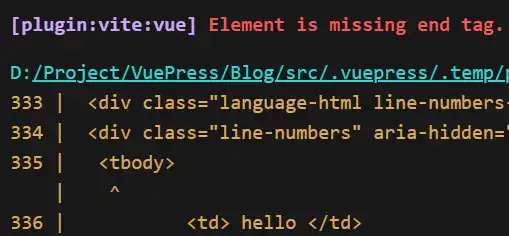
obsidian 中能正常显示
alert
不能在列表后直接使用alert块?需要空一行
1. 序号1
2. fclose
>[!info]
>  The fclose() function flushes the stream pointed to by stream (writing any buffered
> output data using fflush(3)) and closes the under-lying file descriptor.- 序号1
- fclose
相关信息
The fclose()
否则报错:
× Initializing and preparing data - failed in 3.87s
error RangeError: Maximum call stack size exceeded
    at Array.flat (<anonymous>)
    at file:///D:/Project/VuePress/Blog/node_modules/@mdit/plugin-alert/lib/index.js:1:798
    at file:///D:/Project/VuePress/Blog/node_modules/@mdit/plugin-alert/lib/index.js:1:1487
不显示mermaid
ob中效果: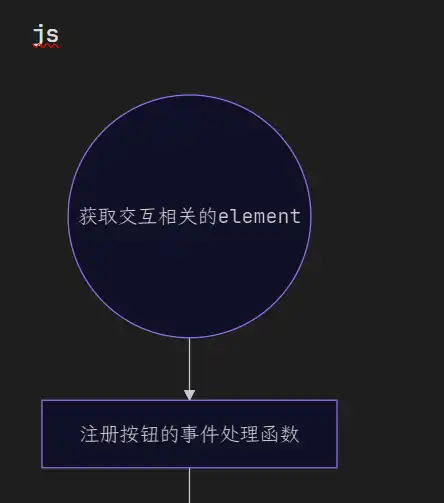
能够显示mermaid
网站:
显示空白,但是占据了空间
。。。不知道什么原因,仍在加载?但是也没看到“转圈圈”