Dialog-Controls
Dialog-Controls
Popup dialog with standard buttons and a title, used for short-term interaction with the user.

窗口的构成
Similarly to ApplicationWindow and Page, Dialog is organized into three sections: header, contentItem, and footer.
Tiltle and Buttons
header
通常作为窗口的标题栏,通过title 属性便捷地设置一个Styl-specific(粗体、加大) 的 title bar作为header。
footer
通常使用DialogButtonBox 用来接收用户输入、关闭窗口。点击按钮触发相应的信号。
实现:
standardButtons: Dialog.Ok | Dialog.Cancel不同的按钮显示的内容不同,触发的信号不同。
Ok触发accepted,cancel触发rejected
closePolicy
Dialog 继承于 Popup,默认情况下,点击窗口外区域就会关闭窗口。
如果要求通过点击窗体内的按钮关闭按钮可以设置Dialog的closePolicy为
closePolicy: Popup.CloseOnEscapeModal and Modeless Dialogs
A modal dialog blocks input to other content beneath the dialog.
A modeless dialog is a dialog that operators independently of other content around the dialog.
通常弹出窗口后,窗口显示在顶层,其余窗口均在其下方。设置modal后 other content 就接收不到 按键、鼠标等输入了。必须关闭当前窗口后才能同other content 交互。
实现:
modal: false
无法点击open dialog
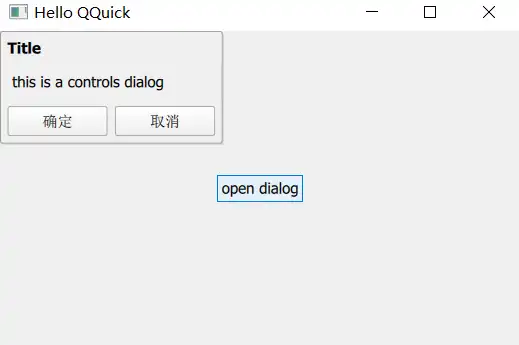
鼠标停留在open dialog 上方时其显示有变换,可以点击按钮,有打印提示