ScrollBar
ScrollBar
Vertical or horizontal interactive scroll bar.
[!quote]
ScrollBar is an interactive bar that can be used to scroll to a specific position. A scroll bar can be either vertical or horizontal, and can be attached to any Flickable, such as ListView and Grid View. It can also be used with ScrollView.
- interactive: 交互的方式
- vertical or horizontal: scroll 的方向
- be attached to any Flickable: 配合其他控件使用
Attaching ScrollBar to a Flickable
在ListView 中添加ScrollBar
实现:
    ListView{
        id: listView;
        anchors.fill: parent
        model: 100
        delegate: Text {
            required property int index
            text: "    " + index
        }
        ScrollBar.vertical: ScrollBar { }
        ScrollBar.horizontal: ScrollBar {}
}| 行号 | 功能 |
|---|---|
| 9 | 添加垂直方向的scrollbar |
| 10 | 添加水平方向的scrollbar |
效果:
以vertical scrollbar为例
- scrollbar的高度和它所在的ListVIew一致,并且两者边缘对齐。相当于显式设置下面的属性:
            parent: listView
            anchors.top: listView.top
            anchors.right: listView.right
            anchors.bottom: listView.bottom
scrollbar默认设置ListView为其父对象
- 没有显示horizontal scrollbar:默认的policy 为 AsNeeded,只在范围不够时显示
按键控制滚动
ScrollBar does not filter key events of the Flickable it is attached to.
上下按键控制滚动
实现:
	ListView {
		focus: true
        ScrollBar.vertical: ScrollBar {
            id: vscroll
        }
        Keys.onUpPressed: vscroll.decrease()
        Keys.onDownPressed: vscroll.increase()
	}
效果: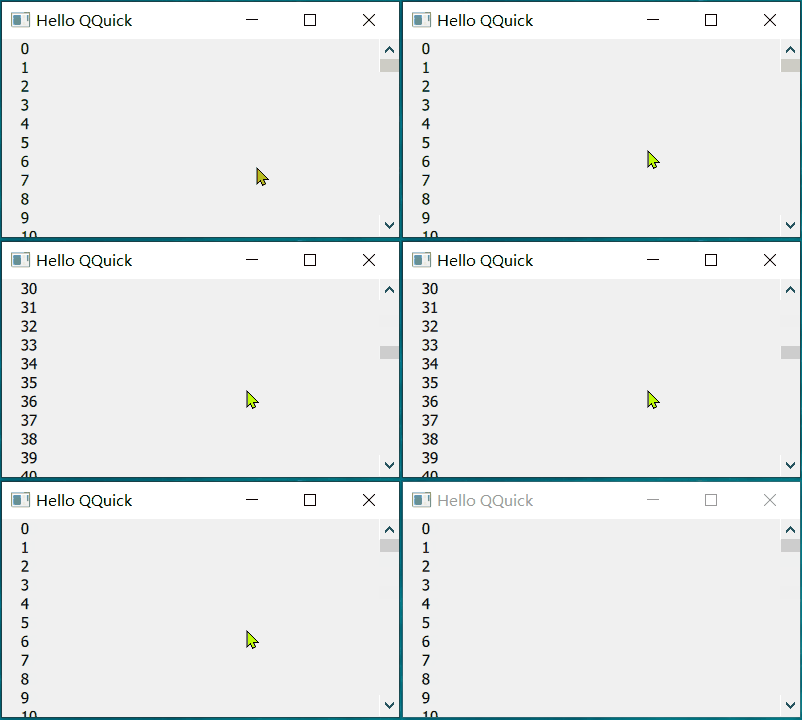
整个scrollbar 的默认范围是0.0 - 1.0,默认滚动的值是0.1 即 整个范围的10%,所以上图中可以看到最上面行的值变换幅度是10(整个model 是100)
horizontal scrollbar
水平方向的scrollbar 和 垂直方向的有点不一样。
增加ListView 显示的文本长度,完全显示内容时: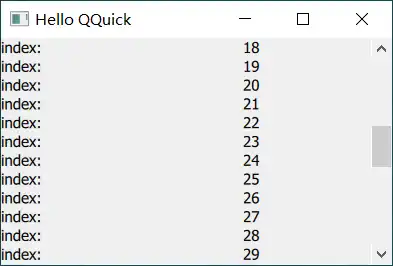
只有vertical 没有 horizontal
减小宽度,显示不完全时:
还是没有horizontal 方向scrollbar
滚动的原理:计算当前显示的内容在 整个Flickable容纳内容中的位置。然后根据鼠标、键盘控制位置切换。
默认情况下不显示 horizontal scrollbar 是因为 Flickable 的宽度(窗口宽度,对应属性width)大于等于 容纳的内容宽度(对应属性contentWidth)。
打印content 和 width的值
qml: contentHeight: 5000
qml: listview width: 640
qml: listview height: 200
qml: contentHeight: 750
qml: onCompleted -------
qml: width: 640  ,contentWidth: -1    //[!code highlight]
qml: height: 200  ,contentHeight: 750     //[!code highlight]
qml: onCompleted -------
contentwidth 的值为-1,始终小于width,不会显示scrollbar
调整:根据显示内容的实际宽度,设置contentWidth。
实现:
      contentWidth: {
            var maxWidth = 0;
            // 遍历所有已创建的委托项,找到最大宽度
            for (var i = 0; i < contentItem.children.length; i++) {
                var child = contentItem.children[i];
                if (child && child.hasOwnProperty("implicitWidth")) {
                    maxWidth = Math.max(maxWidth, child.implicitWidth);
                }
            }
            return (maxWidth + vscroll.width)
}| 行号 | 功能 |
|---|---|
| 4-9 | 计算ListView中最大的implicitWidth |
| 10 | 因为vscroll 占据了Flickable 中的一部分宽度,如果滚动到最右侧时完全显示文本,实际的contentWidth 需要增加这部分宽度 |
效果: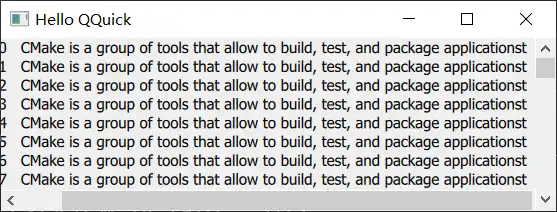
Binding the Active State of Horizontal and Vertical Scroll Bars
Horizontal and vertical scroll bars do not share the active state with each other by default.
同时存在vertical 和 horizontal scrollbar 时,激活一个scrollbar,另一个也激活
实现:
   ScrollBar.horizontal: ScrollBar { id: hbar; active: vbar.active }
     ScrollBar.vertical: ScrollBar { id: vbar; active: hbar.active }
效果:
和说明的不一样,最大化窗口后,只显示了horizontal scrollbar。拖动horizontal scrollbar 时vertical 仍未显示。
问:没搞明白active的含义,如果active 控制是否显示,那么相互绑定后应该同时显示或消失。
Non-attached Scroll Bars
It is possible to create an instance of ScrollBar without using the attached property API.
实现:
 Rectangle {
     id: frame
     clip: true
     width: 160
     height: 160
     border.color: "black"
     anchors.centerIn: parent

     Text {
         id: content
         text: "ABC"
         font.pixelSize: 160
         x: -hbar.position * width
         y: -vbar.position * height
     }

     ScrollBar {
         id: vbar
         hoverEnabled: true
         active: hovered || pressed
         orientation: Qt.Vertical
         size: frame.height / content.height
         anchors.top: parent.top
         anchors.right: parent.right
         anchors.bottom: parent.bottom
     }

     ScrollBar {
         id: hbar
         hoverEnabled: true
         active: hovered || pressed
         orientation: Qt.Horizontal
         size: frame.width / content.width
         anchors.left: parent.left
         anchors.right: parent.right
         anchors.bottom: parent.bottom
     }
}| 行号 | 功能 |
|---|---|
| 13、14 | 计算Text 的位置 |
| 19、20 | 设置触发显示的方式 |
| 21 | 方向 |
| 22 | 设置当前显示的内容 |
| 23-25 | scroll 的位置 |
效果:
其他
- 鼠标停留激活scrollbar:目前滚动滑轮只会在vertical 方向scroll。
要求:鼠标停留在scrollbar 上方后激活该scrollbar,后续滚动滑轮调整该scrollbar