Signal and Handler Event System
Signal and Handler Event System
Application and user interface components need to communicate with each other.
QML has a signal and hander mechanism, where the signal is the event and the signal is responded to through a signal handler. When a signal is emitted, the corresponding signal hander is invoked. Placing logic such as a script or other operations in the handler allows the component to respond to the event.
- emmit signal
- signal handler: placing logic in the handler
- responded through a signal handler
Receiving signals with signal handlers
点击按钮改变Rectangle 的颜色
实现:
 import QtQuick
 import QtQuick.Controls

 Rectangle {
     id: rect
     width: 250; height: 250

     Button {
         anchors.bottom: parent.bottom
         anchors.horizontalCenter: parent.horizontalCenter
         text: "Change color!"
         onClicked: {
             rect.color = Qt.rgba(Math.random(), Math.random(), Math.random(), 1);
         }
     }
}| 行号 | 功能 | 说明 |
|---|---|---|
| 12 | signal hander:修改rect 的颜色 | Button 内定义了clicked 信号,点击按钮时会发射该信号。 signal hander的命名:on<Signal> |
效果: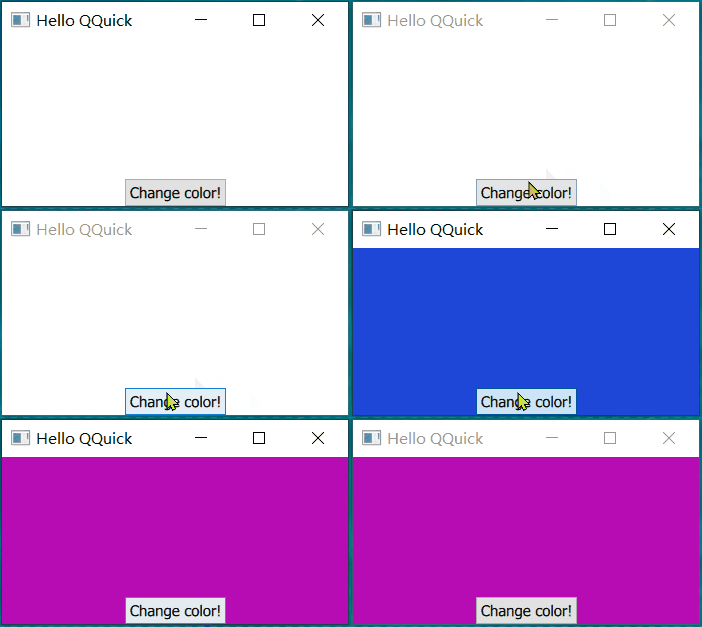
Property change signal handlers
A signal is automatically emitted when the value of a QML property changes.
QML 控件的property 变化时自动发射信号:
- 自定义property 时如果property 有变换需要发射属性变化信号;
- 内置的控件文档中不会包含 property change signal
TapHandler 中有 pressed属性,说明如下:
pressed: bool; read only
Holds true whenever the mouse or touch point is pressed, and any movement since the press is compliant with the current gesturePolicy. When the eventPoint is released or the policy is violated, pressed will change to false.
这是一个只读的bool类型的property。鼠标按下时为true,移动(policy is violated) 或 松开为false。
实现:
        TapHandler {
            onPressedChanged: console.log("taphander pressed?", pressed)
        }
效果:
qml: taphander pressed? true
qml: taphander pressed? false
Signal parameters
Signals might have parameters. To access those, you should assign a function to the handler. Both arrow functions and anoymous functions work.
有一个错误提示信号,包含有错误信息、出错的位置(行、列)参数信息。发生错误时,打印错误信息。
实现:
    Item {
        id: myitem
        signal errorOccurred(message: string, line: int, column: int)
		onErrorOccurred: (msg, line, col) => console.log(`${line}:${col}:${msg}`)
    }
    Button {
        anchors.centerIn: parent
        text: "error"
        onClicked: { myitem.errorOccurred("overflow", 10, 5) }
}| 行号 | 功能 | 说明 |
|---|---|---|
| 3 | 定义出错信号 | |
| 4 | 定义信号对应的handler | 参数的类型由信号定义,handler 只需要声明使用的形参名称 形参的名称不必和信号中声明的相同 |
| 9 | 点击按钮发射错误信号 | 调用信号,给定信号传递的参数 |
效果:
qml: 10:5:overflow- 可以只获取第一个参数 或 省略 后面的参数
实现:
	onErrorOccurred: message => console.log(`${message}`)
	onErrorOccurred: (msg, line) => console.log("line:", line, msg)
效果:
qml: overflow
qml: line: 10 overflow- 如果省略的参数在前面,必须使用placeholder
实现:
onErrorOccurred: (_, _, col) => console.log("col:", col)效果:
qml: col: 5- it is possible, but discouraged,直接使用 { } 代码块,不声明参数。
In that case all signal parameters get injected into the scope of the block.
实现:
onErrorOccurred: { console.log("column:", column) }效果:
qt.qml.context: qrc:/qt/qml/TableViewTest/Main.qml:19:9 Parameter "column" is not declared. Injection of parameters into signal handlers is deprecated. Use JavaScript functions with formal parameters instead.
qml: column: 5
Using the Connections type
In some cases it may be desirable to access a signal outside of the object that emits it.
A Connections object can receive any signal from its specified target.
点击按钮改变颜色,但在button 外响应
实现:
    Rectangle {
        id: rect
        width: 250; height: 250
        anchors.fill: parent
        Button {
            id: button
            text: "Change color!"
        }

        Connections {
            target: button
            function onClicked() {
                rect.color = Qt.rgba(Math.random(), Math.random(), Math.random(), 1);
            }
        }
}| 行号 | 功能 | 说明 |
|---|---|---|
| 11 | 从button 接收信号 | |
| 12 | 定义handler | 函数命名和在button内响应相同,都是on<Signal> |
注
在Connections 中 使用onSignal 隐式地连接信号已经被废弃(不明确),需要显式使用function onSignal()。编译器会报错:
QML Connections: Implicitly defined onFoo properties in Connections are deprecated. Use this syntax instead: function onFoo(<arguments>) { ... }一些示例中仍使用已经废弃的方法连接。
Attached signal handlers
An attached signal handler receives a signal from an attaching type rather than the object within which the handler is declared.
通过上下左右按键改变Rectangle 的位置
实现:
    Rectangle {
        id: rect
        width: 50; height: 50
        color: "green"
        focus: true

        Keys.onUpPressed: event => { y -= 10; event.accepted = true; }
        Keys.onDownPressed: event => { y += 10; event.accepted = true; }
        Keys.onLeftPressed: event => { x -= 10; event.accepted = true; }
        Keys.onRightPressed: event => { x += 10; event.accepted = true; }

}| 行号 | 功能 | 说明 |
|---|---|---|
| 5 | Rectangle 获取焦点,接收按键输入 | |
| 7-10 | 设置attached signal handlers | 按键信号-upPressed 等是在Keys中定义的,但是能够修改rect 的x,y属性 |
The attached signal handler mechanism enables objects to receive particular signals without extra code.
在这个例子中,rect 不需要额外定义按键相关的代码,而是使用 attached type 提供的信号,在attached signal handler 中处理自身属性。
问:attached signal handler 中 是如何访问到 rect 中的属性的?
原文中示例使用的是Component.onCompleted
an object of the Component attaching type with a completed signal has automatically been attached to the Rectangle object by the QML engine. The engine emits this signal when the Rectangle object is created, thus triggering the Component.onCompleted signal handler.
- an object of the Component: 创建了一个Component 的对象;
- 该对象被附加到Rectangle object:该对象能够访问到它所附加的对象的属性、方法
- engine emits this signal:由engine 发射信号;
效果:
方块初始在左上角,通过按键移动到当前位置
Adding signals to custom QML types
定义signal 的语法:
signal <name>[([<type> <parameter name>[, ...]])]说明:
signal: 关键字
name:信号名称
[()) ]:信号可以不带参数,或者只使用()
<type> <parameter name> :参数类型 参数名称
鼠标点击Rectangle 内区域,由信号传递点击位置的坐标值
实现:
   Rectangle {
        id: rect
        color: "green"
        property int side: 100
        property point mouseXY
        width: side; height: side;

        signal activated(real xPosition, real yPosition)
        TapHandler {
            id: handler
            onTapped: rect.activated(rect.mouseXY.x, rect.mouseXY.y)
            onPressedChanged: rect.mouseXY = handler.point.position
        }
        onActivated: (x, y) => console.debug(`(${x},${y})`)
}| 行号 | 功能 | 说明 |
|---|---|---|
| 8 | rect taped 发送位置信息的信号 | |
| 11 | rect taped 后发射信号 | A signal is emitted by invoking the signal as a method. |
| 12 | 更新鼠标位置 | handler 中获取到鼠标位置,然后 更新rect 中定义point |
| 父控件 传递 子控件的信息:在父控件中定义相关属性、信号,在子控件更新信息,发射信号 |
效果:
qml: (0.8,2.4000000000000004)
qml: (45.6,24.8)
Connecting signals to methods and signals
[!quote]
Signal object have a connect() method to a connect a signal either to a method or another signal.
将Rectangle 的 创建完成信号连接到多个method
实现:
    Rectangle {
        id: relay

        signal messageReceived(string person, string notice)

        Component.onCompleted: {
            relay.messageReceived.connect(sendToPost)
            relay.messageReceived.connect(sendToTelegraph)
            relay.messageReceived.connect(sendToEmail)
            relay.messageReceived("Tom", "Happy Birthday")
        }

        function sendToPost(person: string, notice: string) {
            console.log(`Sending to post: ${person}, ${notice}`)
        }
        function sendToTelegraph(person: string, notice: string) {
            console.log(`Sending to telegraph: ${person}, ${notice}`)
        }
        function sendToEmail(person: string, notice: string) {
            console.log(`Sending to email: ${person}, ${notice}`)
        }
}| 行号 | 功能 | 说明 |
|---|---|---|
| 7-9 | 连接信号 | connect(method) |
| 10 | 发射信号 | |
| 效果: |
qml: Sending to post: Tom, Happy Birthday
qml: Sending to telegraph: Tom, Happy Birthday
qml: Sending to email: Tom, Happy Birthday
使用connect 连接到method 和 定义signal handler 的对比
| connect method | handler | |
|---|---|---|
| 数量 | 可以连接到多个method | 只能连接到一个signal |
| 名称 | 任意 | 必须是on<Signal> |
| 动态创建的object | 支持连接到dynamically created objects | 不支持 |
取消连接:
 Rectangle {
     id: relay
     //...
     function removeTelegraphSignal() {
         relay.messageReceived.disconnect(sendToTelegraph)
     }
 }
连接到signals
实现:
    Rectangle {
        id: forwarder
        width: 100; height: 100
        color: "green"

        signal send()
        onSend: console.log("Send clicked")

        TapHandler {
            id: mousearea
            onTapped: console.log("Mouse clicked")
        }

        Component.onCompleted: {
            mousearea.tapped.connect(send)
        }
}| 行号 | 功能 | 说明 |
|---|---|---|
| 6 | rect 定义的send信号 | |
| 7 | rect 定义的send signal handler | |
| 11 | handler 的tapped signal handler | |
| 15 | 将handler 的tapped 信号连接到 rect 的send |
效果:
qml: Mouse clicked
When matching arguments for QQuickRectangle_QML_3::send():
Too many arguments, ignoring 2
qml: Send clicked
tapped 发射后先调用了handler 的tapped signal handler,然后调用了 rect 的send signal,这个信号又触发rect 的 send signal handler。
连接保持的时间
注
Connections to function objects will stay alive as long as the sender of the signal is alive.
只要发射信号的对象存在,那么连接就存在。
显示一排红色方块,通过按钮可以让偶数位置的方块颜色在红色和绿色之间切换。另外一个按钮清除所有方块
实现:
    Item {
        id: item
        property color globalColor: "red"

        Button {
            text: "Change global color"
            onPressed: {
                item.globalColor = item.globalColor === Qt.color("red") ? "green" : "red"
            }
        }

        Button {
            x: 150
            text: "Clear rectangles"
            onPressed: repeater.model = 0
        }

        Repeater {
            id: repeater
            model: 5
            Rectangle {
                id: rect
                color: "red"
                width: 50
                height: 50
                x: (width + 2) * index + 2
                y: 100
                Component.onCompleted: {
                    if (index % 2 === 0) {
                        item.globalColorChanged.connect(() => {
                            color = item.globalColor
                        })
                    }
                }
            }
        }
}| 行号 | 功能 | 说明 |
|---|---|---|
| 8 | 切换even Rectangle 的颜色 | |
| 15 | 清除Rectangle | |
| 29 | 判断Rectangle 序号 | |
| 31、32 | 信号even Rectangle 颜色变化时更新Rectangle颜色 | 连接到匿名 method |
效果:
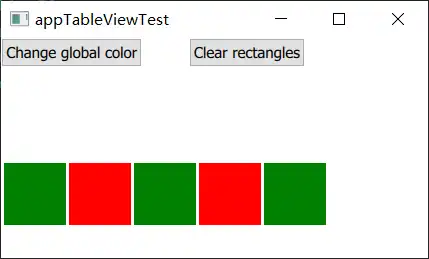
qml: item: QQuickItem_QML_9(0x17d383c7290)  rect: QQuickRectangle(0x17d383c6ff0)
qml: item: QQuickItem_QML_9(0x17d383c7290)  rect: QQuickRectangle(0x17d383c7370)
qml: item: QQuickItem_QML_9(0x17d383c7290) rect: QQuickRectangle(0x17d38565670)qml: item: undefined rect: null
qrc:/qt/qml/TableViewTest/Main.qml:39: TypeError: Cannot read property 'globalColor' of undefined
qml: item: undefined rect: null
qrc:/qt/qml/TableViewTest/Main.qml:39: TypeError: Cannot read property 'globalColor' of undefined
qml: item: undefined rect: null
qrc:/qt/qml/TableViewTest/Main.qml:39: TypeError: Cannot read property 'globalColor' of undefined调用了3次 method,错误信息提示 无法读取未定义的globalColor。
问:Rectangle 销毁后 color 不也应该无法访问了吗?为什么不提示 color 错误,而是提示globalColor错误?
清除后method 中访问到的rect 变成了 null, item 变成了undefined
问:所以在qml中定义的函数是普通的函数,会一直存在?
问:如果使用cpp 注册到QML中的类型,连接到该类型定义的method,那么类对象销毁后是否仍会调用method?类的非全局方法必须通过类对象调用。
explicit disconnected
在销毁Rectangle 时显式调用disconnect 断开连接。
- disconnect 需要 method 作为参数
- 由于上面的示例中,连接的是匿名函数,无法disconnect,所以需要修改为命名函数
实现:
	Rectangle {
		//...
		function updateColor() {
			color = item.globalColor
		}
		Component.onDestruction: {
			console.debug("destruction", index)
			item.globalColorChanged.disconnect(updateColor)
		}
	}
效果:
qml: destruction 4
qml: destruction 3
qml: destruction 2
qml: destruction 1
qml: destruction 0