Attribute selectors
2026/8/11大约 2 分钟
Attribute selectors
In CSS you can use attribute selectors to target elements with certain attributes.
Presence and value selectors
These selectors enable the selection of an element based on the presence of an attribute alone, or on various different matches against the value of the attribute.
    <ul>
      <li class="0">Item 0</li>
      <li class="1">Item 1</li>
      <li class="0 1 2">Item 2</li>
      <li class="3 1-">Item 3</li>
      <li>Item 4</li>
    </ul>
attr
      li[class] {
        color: red;
      }
匹配存在class attribute的li
效果: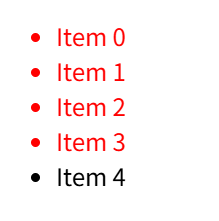
attr=value
      li[class="0"] {
        color: red;
      }
匹配具有class attribute 且 class 为 0 的li
效果: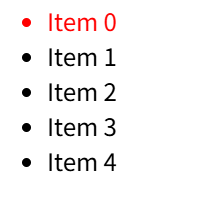
Item 1、2、3 虽然有class attribute,但是值为1,不匹配
attr~=value
      li[class~="1"] {
        color: red;
      }
匹配具有class attribute,且值里面包含了1的li
效果: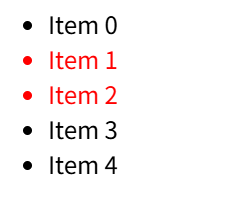
Item 3的class的值为 1-,不匹配1
attr|=value
      li[class|="1"] {
        color: red;
      }
匹配具有class attribute,attribute的值为1,或者(值是1开头,且后面跟着-,且是第一value)的 li
效果: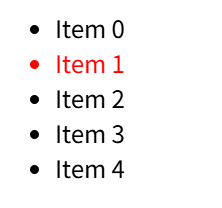
Item 1 完全匹配
Item 3 的 1- 不是第一个值
修改下:
<li class="1- 3">Item 3</li>效果: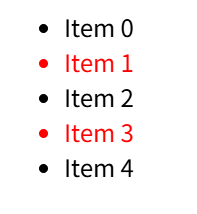
- presence:是否存在attribute
- the value of the attribute: 值是多少/包含值/值的类型
Substring matching selectors
These selectors allow for more advanced matching of substrings inside the value of your attribute.
    <ul>
      <li class="box-warning">Item 0</li>
      <li class="box-error">Item 1</li>
      <li class="error-box">Item 2</li>
      <li class="warning-box">Item 3</li>
      <li>Item 4</li>
    </ul>
attr^=value
      li[class^="box"] {
        color: red;
      }
以box起始
效果: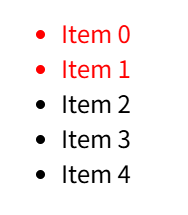
attr$=value
      li[class^="box"] {
        color: red;
      }
以box结尾
效果: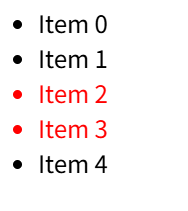
attr*=value
      li[class*="box"] {
        color: red;
      }
包含了box
效果: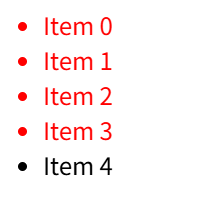
Case-insensitivity
html 是 case-sensitivity的
    <ul>
      <li class="a">Item 0</li>
      <li class="A">Item 1</li>
</ul> li[class^="a"] {
color: red;
}匹配小写字母a
效果:
如果想要case-insensitivity,需要添加标识 i
      li[class^="a" i] {
        color: red;
      }
效果: