Basic selectors
Basic selectors
- Type selectors(tag name selector): selects an HTML tag/element in your document.
Class selectors
Targeting classes on particular elements
    <h1 class="highlight">Class selectors</h1>
    <p>普通的p <span class="highlight">带有类的span</span></p>
<p class="highlight">带有类的p</p> span.highlight {
background-color: yellow;
}
h1,
.highlight {
background-color: pink;
}| 行号 | 功能 | 说明 |
|---|---|---|
| 1-3 | 设置属于highlight类的span的背景颜色 | |
| 4-7 | 设置h1 及 所有 highlight类的 elements的背景颜色 |
- type selector 和 class之间不能有空格,否则变为了descendant combinator - span的后代中 是highlight的element
效果: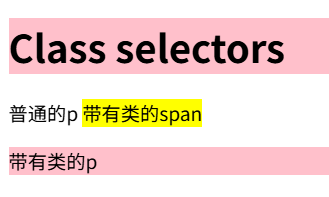
Target an element if it has more than one class applied
You can apply multiple classes to an element and target them individually, or only select the element when all of the classes in the selector are present.
    <div class="notebox">This is an informational note</div>
    <div class="notebox warning">This note shows a warning</div>
    <div class="notebox danger">This note shows danger!</div>
    <div class="danger">This won't get styled</div>
.notebox {
border: 4px solid;
padding: 0.5em;
margin: 0.5em;
}
.notebox.warning {
border-color: orange;
}
.notebox.danger {
border-color: red;
}- element定义所属的多个类时类名之间空格间隔
- class selecotr之间不能空格
效果: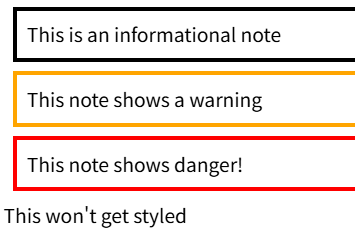
ID slectors
<h1 id="heading">ID selector</h1> #heading {
color: red;
}- an ID can be used only once per page:
- elements can only have a single id value:
问:为什么在vscode中对单个element设置多个id值不会报语法错误?
Selector lists
      h1,
      .highlight {
        background-color: pink;
      }
应用同一个rule到不同的selector,每个selector使用","间隔
When you group selectors in this way, if any selector is syntactically invalid, the whole rule will be ignored.
h1, ..special { ... }所有selector都应该有效,否则列表中的有效selector也不会被应用
The universal selector
    <h1>Universal selector</h1>
    <p>The universal selector is indicated by an asterisk (*).</p>
* {
margin: 0;
}
div * {
color: red;
}It selects everything in the document.
对于
div *可以看作是 descendant combinator,第一个selector 是 div,第二个selector 是 *,匹配div的所有 descendant
效果: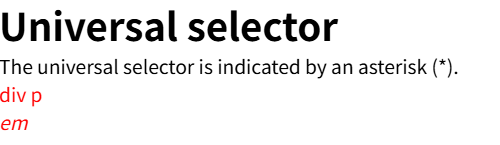
Using the universal selector to make your selectors easier to read
article :first-child {
	font-weight: bold;
}

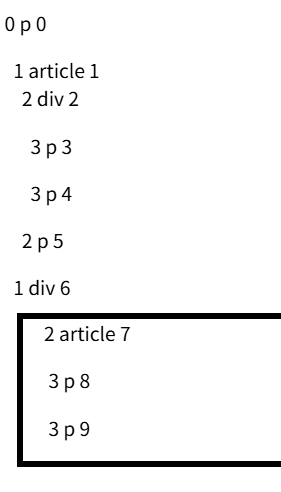
article:first-child {
	font-weight: bold;
}
关于 first-child
represents the first element among a group of sibling elements.
| 行号 | 功能 | 说明 |
|---|---|---|
| 1-3 | 匹配article descendant所有的第一个element | article 和 :first-child之间有空格,它们是两个selector。在article的descendant中查找符合:first-child的element |
| 5-7 | 匹配article,且该artile element是first-child(another的) | 中间没有空格。找类型为article,且符合:first-child的element |
<p>0 p 0</p>
<article>
1 article 1
<div>
2 div 2
<p> 3 p 3</p>
<p> 3 p 4</p>
</div>
<p> 2 p 5</p>
</article>
<div>
1 div 6
<article>
2 article 7
<p> 3 p 8</p>
<p> 3 p 9</p>
</article>
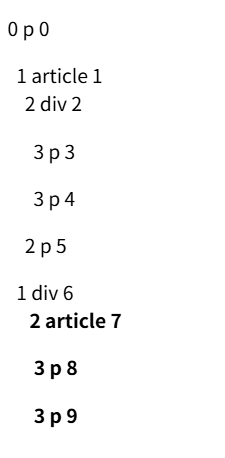
</div>- element name 前的数值表示层级,后的数值表示序号
- &nsp表示空格,空格的数量和所在的层级相关
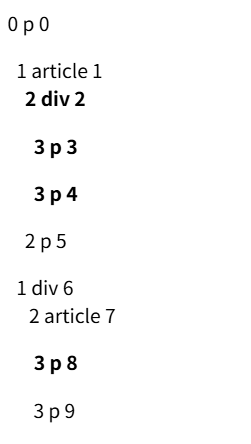
2 div 2,3 p 8 都是article下的第一个element,所以它们应用样式设置。
问:为什么3 p 3 和 3 p 4 都是bold?
答:因为font-weight 是 inherited properties,div的 descendant会继承该属性值。
2 article 7 是article且是div下的第一个element
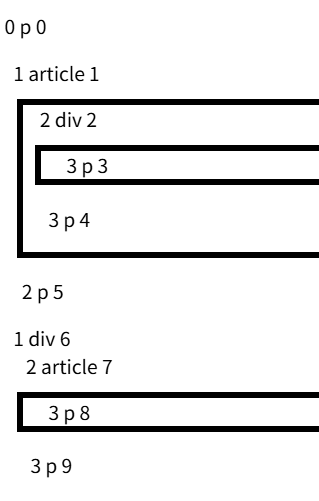
现在对 non-inherited properties - border 进行设置
      article :first-child {
        border: 5px solid black;
        margin: 10px;
      }
使用 Universal selector明确selector的范围
article *:first-child {}
article :first-child {}
2给我的感觉只是找article的大儿子(大女儿),不清楚对于大孙子(大孙女)匹不匹配。1就更加明确一点,在article的所有后代中查找,包括了大儿子、大孙女、大重孙。。。