Getting started with CSS
Getting started with CSS
Adding CSS to our document
There are three different ways to apply CSS to an HTML document
- External stylesheets
<link rel="stylesheet" href="styles.css" />h1 {
color: red;
}- Internal stylesheets
<head>
<style>
p {
color: purple;
}
</style>
</head>- Inline styles
<body>
<span style="color: purple; font-weight: bold">span element</span>
</body>Using common selectors
Selecting HTML elements
this is a selector that directly matches an HTML element name.
p,
li {
color: green;
}
h1 {
  color: red;
}Adding a class
<p>p one</p>
<p class="special">p two</p>
.special {
color: orange;
}Styling things based on their location in a document
- descendant combinator:子级
typically represented by a single space(" ")character-combines two selectors such that elements matched by the second selector are selected if they have an ancestor(parent, parent's parent, etc.) element matching the first selector.
如果第二个selector匹配的element是第一个selector的 descendant,那么会匹配第二个selector。
问:。。。为什么感觉这么怪,我的理解是在第一个selector下找和第二个selector匹配的element,难道说通常第二个selector比较特别,所以才会从下往上找
<p>Get out of bed <em>now</em>!</p>
<ul>
	<li>Get out of bed <em>now</em>!</li>
</ul>
li em {
color: red;
}效果: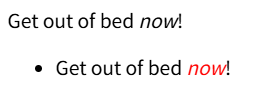
注
descendant的中文含义是后代/子孙
<article>
  <p>
    p
    <em>em</em>
  </p>
</article>
em是p的子级,p是article的子级,em是article的子子级
article em {
  color: red;
}
效果:
- next-sibling combinator:相同层级 且 相邻
<h1>标题 0</h1>
<p>段落 0</p>

<h1>标题 1</h1>
<em>间隔了一个em</em>
<p>段落1</p>
h1 + p {
font-size: 200%;
}效果: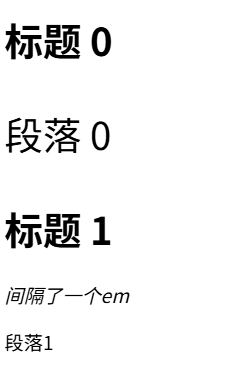
Combining Selectors and combinators
you can combine multiple selectors and combinators together.
  <body>
    <h1>h1</h1>
    <p>
      p
      <em class="special">special em</em>
      <em>em</em>
    </p>
  </body>
h1 + p .special {
color: green;
}设置和h1相邻的p的 descendant 中 class 为 special的 element的 color为 green
Styling things based on state
a(anchor element) 有多种state:
- hover: when a user designates an item with a pointing device, such as holding the mouse pointer over the item.
鼠标停留在元素上方时的状态
这里hover的定义是针对所有具有hover状态的element,而不是单独对a定义的。 - link: Matches links that have not yet been visited
- visited: Matches links that have been visited
这些状态是通过叫做 Pseudo-classes 实现的
A CSS pseudo-class is a keyword added to a selector that lets you select elements based on information that lies outside of the document tree, such as a specific state of the selected element(s).
Syntax
selector:pseudo-class {
	property: value;
}a:hover {
color: red;
}默认:鼠标指针形状变化
设置后:链接颜色变为红色
a:link {
	color: green;
}
默认:链接显示为蓝色
设置后:显示为绿色
Other CSS syntax features
Functions
calc() function
四则运算
<div class="outer"><div class="box">The inner box is 90% - 30px.</div></div>.outer {
border: 5px solid black;
width: 300px;
}
.box {
width: calc(90% - 30px);
background-color: green;
color: red;
}| 行号 | 功能 | 说明 |
|---|---|---|
| 2 | 设置外部div的边框样式 | |
| 7 | 计算内部div的width | 90%:containing 宽度的90%,减去30px |
效果: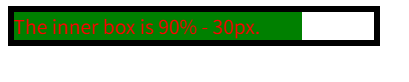
@rules (At-rules)
At-rules are CSS statements that instruct CSS how to behave.
CSS @rules provide instructions for how CSS should behave.
body {
	background-color: pink;
}

@media (width >=30em) {
	body {
		background-color: blue;
	}
}| 行号 | 功能 | 说明 |
|---|---|---|
| 2 | 设置背景颜色为粉色 | |
| 5 | at-rules | @:语法起始符号; media: an identifier, instruction 的范围/内容 (with > 30em): condition,在满足该条件时应用下面的css {body{...}}: 具体要应用的css |
Shorthand properities
可以在一行里设置多个属性值,属性值之间以空格间隔
.outer {
	border: 5px solid black;
}
等价于:
.outer {
	border-width: 5px;
	border-style: solid;
	border-color: black;
}问:属性值的数量、排序是否有要求?
比如这样
.outer {
	border: solid 5px
}
先设置style,再width
答:可以,虽然syntax中没有说明,但是实际上样式设置有效果
CSS Comments
/* Comments
abb*/
p { color:red }
/* test
h { color: green; }
*/