NoteBook Navigator
2026/8/11小于 1 分钟
NoteBook Navigator
Calendar and tools
Calendar
配置项及值:
- Calendar placement:
Right sidebar
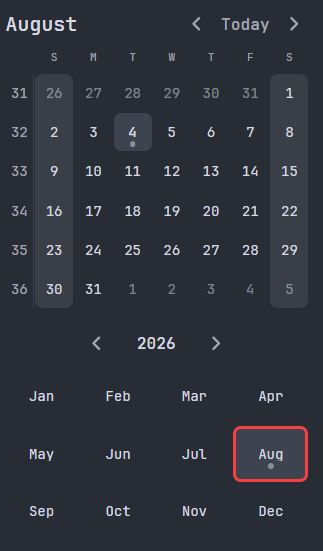
Left sidebar
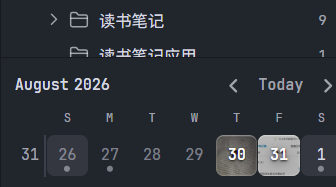
Appearance
| 配置项目 | 功能 | 值:含义/说明 | 当前配置 |
|---|---|---|---|
| Weekend days | Show weekend days with a different background color. | None; Saturday and Sunday; Friday and Saturday; Thursday and Saturday | Friday and Saturday: 总结、整理,为放假做准备 |
| Show feature image | Display feature images for notes in the clandar | 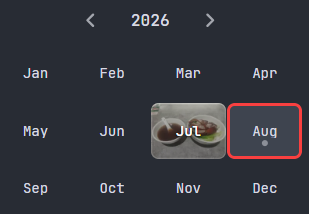 | off |
| Show week number | Add a column with the week number.左侧添加一列用于表示一年开始的第几个星期 | ||
| Show quarter |
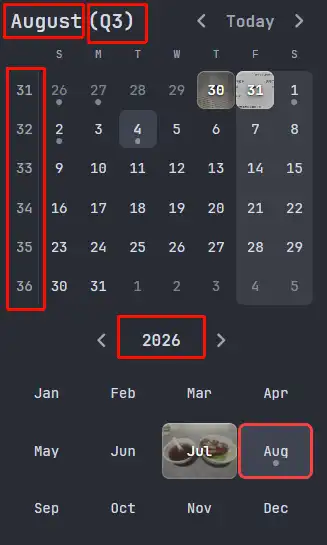
点击以上红色方框圈定区域,可以创建/打开 对应的notes:weekly、Monthly、Quarterly、Yearly
改进:
- Weekend days:可以自由指定星期
Calendar integration
| 配置项目 | 功能 | 值:含义/说明 | 当前配置 |
|---|---|---|---|
| Daily note source | Source for calendar notes | 1. Notebook Navigator: 由当前插件指定note相关配置 2. | 1 |
| Root folder | Base folder for periodic notes | 默认存放在vault根路径下 | Daily Notes |
| Daily Notes | 每日日记的文件名称 及 模板 | 如果安装了Templater plugin,那么是按照Templater进行替换的。 | YYYY-MM-DD:2026-01-19.md; |