Forms and buttons
Forms and buttons
Buttons
<script>
  const btn = document.querySelector("button");
  btn.addEventListener("click", () => {
	btn.textContent = "YOU CLICKED ME!! ❤️";
	setTimeout(() => {
	  btn.textContent = "Press me";
	}, 1000);
  });
</script>
The anatomy of a form
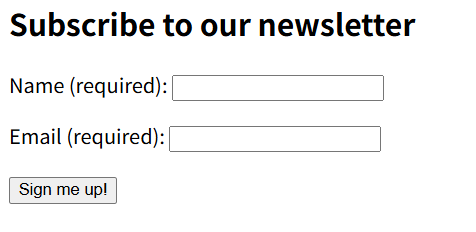
- Subscribe to our newsletter: 表单的标题
- Name (required): 表单中的内容
- Sign me up: 提交表单信息的按钮
<form action="./submit_page" method="get">
  <h2>Subscribe to our newsletter</h2>
  <p>
	<label for="name">Name (required):</label>
	<input type="text" name="name" id="name" required />
  </p>
  <p>
	<label for="email">Email (required):</label>
	<input type="email" name="email" id="email" required />
  </p>
  <p>
	<button>Sign me up!</button>
  </p>
</form>
The <form> element
A <form> element, which wraps all of the other form content. Any form controls inside the <form> </form> tags are part of the same form, and their data is included when the form is submitted.
问:
什么时候form 会被submit?
点击按钮时会submit
问:如果有多个按钮呢?如何确定/指定提交信息的按钮?form controls 包含哪些?
数据会被submit 到哪里?
如何传递data?
- action: Contains a path to the page that we want to send the submitted form data to, to be processed.
填写的内容:
Name:123
Eamil:123@qq.com
点击按钮后跳转到的url:
http://127.0.0.1:3000/submit_page?name=123&email=123%40qq.com- method: Specifies the data transmission method you want to use for sending the form data to the server.
get: the data to be sent as parameters attached to the end of the URL. - ?name=123:
- &email=123%20qq.com:
Structuring forms
You can include HTML elements you like inside a <form> element to structure the form elements themselves and provide containers to target with CSS for styling.
<label> elements
provide identifying labels associated with form controls that describe the data that should be entered into them.
<label for="name">Name (required):</label>- for: 用来关联label对应的form control,name 为对应的 formcontrol的id
Explicit and implicit form labels
分别定义label 以及 form controls,然后通过设置label的for 属性 以及 form controls 的id 属性为同一值 来确定关联,这种style被称为 explicit form label
还可以在label 内定义 form control
<label>
	Name (required):
	<input type="text" name="name" required />
</label>
此时关联关系是默认存在的,无需指定for。这种style被称为 implicit form label
<input> elements
The <input> elements represent the different data items entered into the form.
<input type="text" name="name" id="name" required />- type: Specifies the type of form control to create.
    <form>
      <p>
        button
        <input type="button" />
      </p>
      <p>
        checkbox
        <input type="checkbox" />
      </p>
      <p>
        color
        <input type="color" />
      </p>
      <p>
        date
        <input type="date" />
      </p>
    </form>
效果: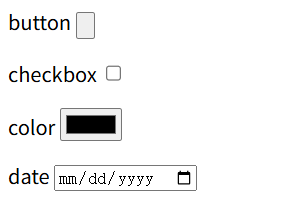
点击 color 可以选择颜色: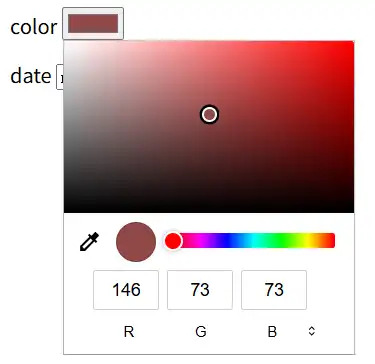
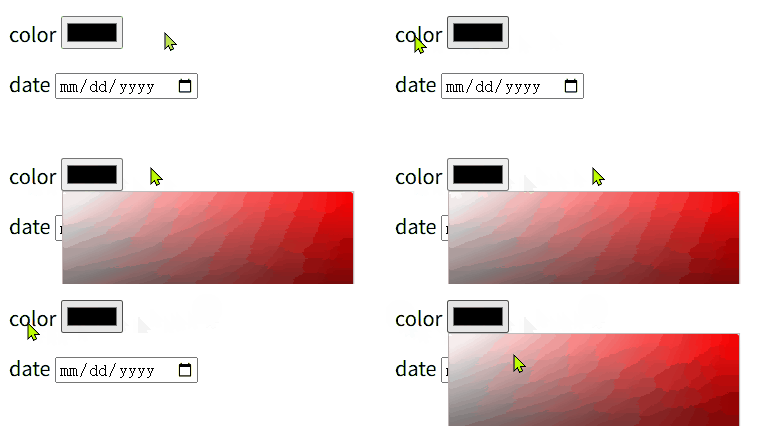
label 可以扩大controls的选择范围
默认情况下只有点击 control 本身才能进入编辑模式,但是如果control 关联了label,那么点击label也能进入control的编辑模式(相当于点击了control本身)
- name: Specifies a name for the data item. When the form is submitted, the data is sent in name/value pairs.
按照键值对的形式发送control 中输入的数据
| type | input | outpur(url) | 说明 |
|---|---|---|---|
| checkbox | 选中 | submit_page?name=on | |
| 未选中 | submit_page? | ||
| button | submit_page? | ||
| text | 1 2 3 | submit_page?name=1+2+3 | 空格会被+替代?后续省略 submit_page? |
| 1+2+3 | 1%2B2%2B3 |
- id: Specifies an ID that can be used to identify the element.
- required: Specifies that a value has to be entered into the form element before the form can be submitted.
声明了required后 input 必须输入内容(有值),才可以submit,否则无法submit。
text声明了required但是没有输入值时进行submit时的错误提示: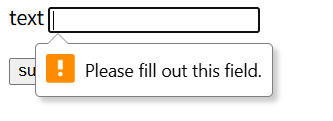
有些type 的input具有默认值
对于没有默认值的input,可以通过 value attribute设置初始值
Specialized text field inputs
有几种用于特定内容输入类型
- number:只能输入数字
- password:用* 或 • 代替输入内容
- tel:电话号码,需要指定号码格式
- email:电子邮箱
The <button> element
When a <button> element is included inside a <form> element, its default behavior is that it will submit the form.
- 如果form下包含了多个button,那么每个按钮都可以submit
- 可以通过如下设置,显式声明具有submit 功能的button是哪一个
<buttom type="subit">额,基本上没用。首先,一个form应该只定义一个button,如果需要多个按钮,那么应该使用 input type="button"?
- 设置 type = "button" creates a button with the same behavior as buttons specified outside of <form> elements
input: type="submit" reset button, they have many disadvantages compared to their <button> counterparts. You should use <button> instead.
An aside on accessibility
using the correct semantic elements to create forms
浏览器已经为semantic elements 实现了很多功能,不要因为外观上的美观创造表象相同的elements替代 semantic elements
一些默认提供的功能:
- tab/shift+tab(tabbing): 可以在form controls之间切换(前进/后退)
- focus outline: causes the focused element to be highlighted using a blue outline.
Other control types
Radio buttons
<div>
  <input
	type="radio"
	id="hotelChoice1"
	name="hotel"
	value="economy"
	checked
  />
  <label for="hotelChoice1">Economy (+$0)</label>
  <input type="radio" id="hotelChoice2" name="hotel" value="superior" />
  <label for="hotelChoice2">Superior (+$50)</label>
  <input
	type="radio"
	id="hotelChoice3"
	name="hotel"
	value="penthouse"
	disabled
  />
  <label for="hotelChoice3">Penthouse (+$150)</label>
</div>
效果:
These render as a set of push button controls where only one of the set can be selected at any one time - you can't select more than one at once.
radio的功能:同一时间,最多只能有一个radio button被选中.
同一组radio buttons 中可以没有选中项
问:如果有多组radio buttons,如何确定一组radio buttons?
- name:同一组的radio buttons 需要具有相同的name
- value: 在value中设定radio button对应的值
- checked:具有两个功能
- 设置默认选中项
- 无法取消选中
- disabled: 无法选中,在选项不可用(如缺货)的情况下设置为disabled
fieldset
The <fieldset> element is used to group several controls as well as labels within a web form.
为了更明显地描述/区分 选项的功能,使用 fileset 进行分组
对比使用fieldset 和 label进行分组
    <fieldset>
      <legend>Choose hotel room type:</legend>
      <div>...</div>
    </fieldset>
<label>
      Choose hotel room type:
	<div>...</div>
</label>
fieldset 会显示一个边框,包围controls。
fieldset内 legend的文本会显示在框线上
Checkboxes
实现:
<fieldset>
  <legend>Choose classes to attend:</legend>
  <div>
	<input type="checkbox" id="yoga" name="yoga" checked/>
	<label for="yoga">Yoga (+$10)</label>

	<input type="checkbox" id="coffee" name="coffee" />
	<label for="coffee">Coffee roasting (+$20)</label>

	<input type="checkbox" id="ballon" name="balloon" disabled />
	<label for="ballon">Ballon animal art (+$5)</label>
  </div>
</fieldset>
效果:
注
It is possible to change the value submitted for a checkbox by giving it a value attribute.
默认选中的checkbox 的value是on,设置value attribute后选中的checkbox的value就是对应的值
<input type="checkbox" id="yoga" name="yoga" checked value="yes" />结果:
/submit_page?yoga=yes
Drop-down menus
实现:
  <label for="transport">How are you getting here:</label>
  <select name="transport" id="transport">
	<option>--Please choose an option--</option>
	<option value="plane">Plane</option>
	<option value="bike">Bike</option>
	<option value="walk" selected>Walk</option>
  </select>
效果: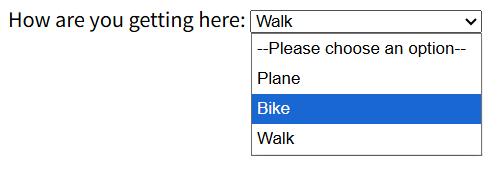
- select:指定name
- option:可选项,指定value
If you don't specify a value, the text inside the <option>\ </option> tags is used as the value
选中第一项时提交的值:transport=--Please+choose+an+option--
- selected:设置默认选中项
可以使用optgroup 对option进行分组
实现:
	。。。
	<select name="transport" id="transport">
	  <optgroup label="分组1">
		<option>--Please choose an option--</option>
		<option value="plane">Plane</option>
	  </optgroup>
	  <optgroup label="分组2">
		<option value="bike">Bike</option>
		<option value="walk" selected>Walk</option>
	  </optgroup>
	</select>
效果: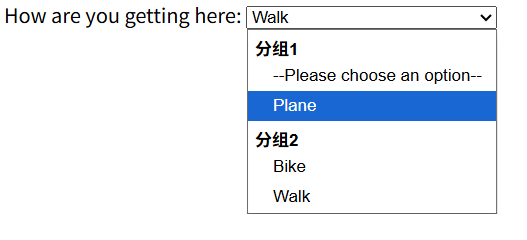
Multi-line text input fields
实现:
        <label for="comments">Any other comments:</label>
        <textarea id="comments" name="comments"></textarea>
效果:
可以指定文本输入区域的大小
<textarea id="comments" name="comments" rows="5" cols="3"></textarea>效果: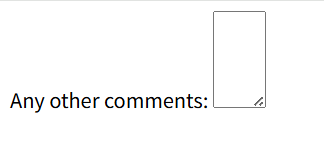
If they are not specified, the value used are cols="20" and row="2"
问:通过开发者工具查看element的 properties cols确实为20
但为什么一行输入的字符(数字)的数量却是22个?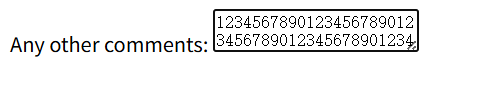
如果全是中文,那么可输入字符数量是11个
那这里row=20,20后面的单位是什么?
可以通过鼠标拖动右下角的按钮修改 textarea 的大小
<textarea id="comments" name="comments" style="width: 190px; height: 73px;"></textarea>指定width、height
Form validation
validation的意义:
- 确保输入/传递正确的数据
- 保护隐私以及数据安全
two types of form validation:
- Client-side validation: 通过指定 form validation attributes (like
required) and Js
可以给予用户输入提示,但是不能防范 malicious data from getting through. - Server-side validation: