Basic HTML syntax
Basic HTML syntax
Anatomy of an HTML
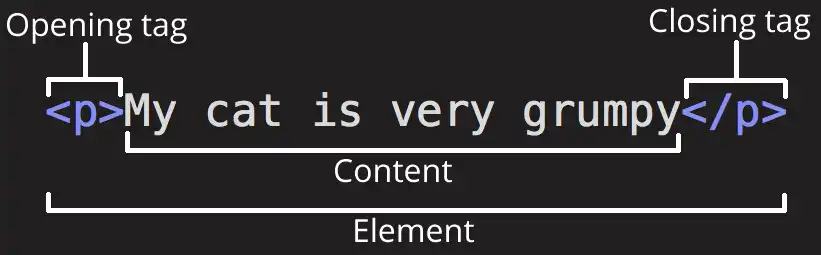
- Opening tag: 起点
- Content
- Closing tag: 终点
Nesting elements
可以在一个element内放置另一个element
My cat is very grumpy
<p>My cat is <strong>very</strong> grumpy</p>但是注意Closing tag的位置,以下代码:
<p>My cat is <strong>very </p></strong>stroing的closing tag 在 p 之后
vue直接报错:Element is missing end tag
在另一个element内的必须在其内部close
html element的名称不区分大小写
My cat is ...
<P>My cat is ...</p>但是通常使用小写
void elements
一些element不需要包含content - 它的功能没有要显示的内容,或者显示的内容不是文本(比如图片、视频、链接。。。)
这样的element没有closing tag 或者 说 opening tag 和 closing tag 合并在一起了
如:
This is a single paragraph, but we are going to
break it onto two lines. br 后的 / 可以空多行,如
再次换行
<p>
  This is a single paragraph, but we are going to <br />break it onto two lines. br 后的 / 可以空多行,如 <br   />再次换行
</p>
Attributes
Attributes contain extra information about the element that isn't part of its content.

- class: name
- editor-note: value
关于attribute的定义格式:
- 必须和element name 间隔:至少一个空格的距离
- 使用 = 对attribute进行赋值
- 多个attribute之间使用空格间隔
- 在""内设置value
Boolean attributes
Sometimes you will see HTML attributes written without values. These are called Boolean attributes.
当一个element 含有 Boolean attribute时,如果在属性列表中出现该attribute,无论分配的值是什么 或 不进行分配,attribute 都是true。如果没有出现,则其值是false 或者说默认值是false
<label for="first-input">This input is disabled</label>
<input id="first-input" type="text" disabled="disabled" />
<br />
<label for="second-input">This input is also disabled</label>
<input id="second-input" type="text" disabled />
<br />
<label for="third-input">This input isn't disabled; you can type into it</label>
<input id="third-input" type="text" />
input 的disabled 决定其是否能够接收输入,true:不接受;false:接收。
第一、第二个input 出现了disabled attribute,其值为true,所以不能接收输入
第三个input 没有disabled,所以能够接收输入
label 中for属性将其关联到对应id的input上
Omitting quotes around attribute values
<a href=https://www.mozilla.org/> favorite website</a>
<a href=https://www.mozilla.org/ title=The Mozilla homepage>favorite website</a>
在value不包含空格时,能够将其当作一个整体赋值给attribute。但是如果value中包含了空格,如:The Mozilla homepage, The被解释为title的value,Mozilla、homepage 被解释为Boolean attribute
最佳实践:所有value都使用quotes包围
Single or double quotes?
<a href='https://www.example.com'>A link to my example.</a>

<a href="https://www.example.com">A link to my example.</a>
都可以
使用注意事项:
- 必须以同一种类型的quote作为开始以及结尾(使用同一种类型的quote包围value)
<a href="https://www.example.com'></a>报错:Invalid end tag
2. 可以包含另一种类型的quote
<a href='https://www.example.com' title="在double quotes 内包含single qutoes'' ">鼠标停留在连接上查看效果</a>- 如果要包含同种类型的qutoe,必须使用 Character References
<a href='https://www.example.com' title="在double quotes 内包含 double qutoes " ">鼠标停留在连接上查看效果</a>Character References
要在value、content中使用语法本身规定的字符需要使用其等效字符
| Literal character | Character reference equivalent | character name |
|---|---|---|
| < | < | less than |
| > | > | greater than |
| " | " | quotation |
| ' | ' | apostrophe |
| & | & | ampersand |
Comments
I'm not inside a commment
<p>I'm not inside a commment</p>
<!-- <p> I am!</p> -->