Video and audio
Video and audio
The <video> element
<video src="/test/msedge_CeBceC8xcR.mp4" controls>
	<p>
		Your browser doesn't support HTML video.
	</p>
</video>
Contents of a media file
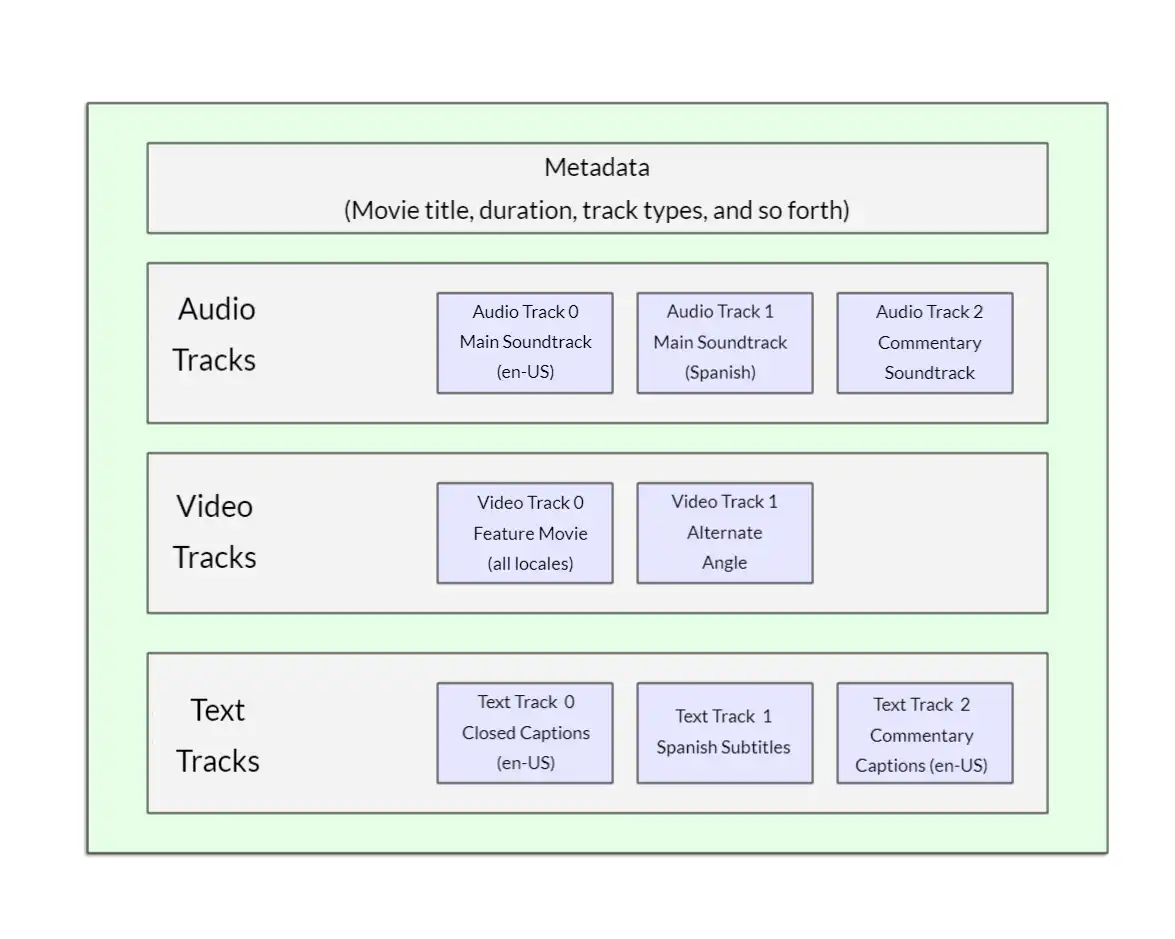
一个视频文件包含的内容:
- media container format (file type):视频文件本身的类型
A media container is a file format that encapsulates one or more media streams (such as audio or video) along with metadata, enabling them to be stored and played back together.
container
- Metadata:包含的tracks的类型
使用 PotPlayer 查看示例视频文件的属性:
Complete name : D:\download\Multiple format video example.mp4
Format : MPEG-4
Format profile : Base Media / Version 2
Codec ID : mp42 (mp42/mp41)
File size : 815 KiB
Duration : 7 s 800 ms
Overall bit rate : 856 kb/s
Frame rate : 30.000 FPS
Encoded date : 2012-03-31 19:46:48 UTC
Tagged date : 2012-03-31 19:46:48 UTCID : 1
Format : AVC
Format/Info : Advanced Video Codec
Format profile : Constrained Baseline@L1.3
Format settings : 2 Ref Frames
Format settings, CABAC : No
Format settings, Reference fra : 2 frames
Format settings, Slice count : 2 slices per frame
Codec ID : avc1
Codec ID/Info : Advanced Video Coding
Duration : 7 s 800 ms
Bit rate : 596 kb/s
Width : 320 pixels
Height : 240 pixels
Display aspect ratio : 4:3
Frame rate mode : Constant
Frame rate : 30.000 FPS
Color space : YUV
Chroma subsampling : 4:2:0 (Type 2)
Bit depth : 8 bits
Scan type : Progressive
Bits/(Pixel*Frame) : 0.259
Stream size : 567 KiB (70%)
Language : English
Encoded date : 2012-03-31 19:46:48 UTC
Tagged date : 2012-03-31 19:46:48 UTC
Color range : Limited
Color primaries : BT.601 NTSC
Transfer characteristics : BT.709
Matrix coefficients : BT.601
Codec configuration box : avcCID : 2
Format : AAC LC
Format/Info : Advanced Audio Codec Low Complexity
Codec ID : mp4a-40-2
Duration : 7 s 767 ms
Bit rate mode : Constant
Bit rate : 256 kb/s
Channel(s) : 2 channels
Channel layout : L R
Sampling rate : 44.1 kHz
Frame rate : 43.066 FPS (1024 SPF)
Compression mode : Lossy
Stream size : 243 KiB (30%)
Language : English
Encoded date : 2012-03-31 19:46:48 UTC
Tagged date : 2012-03-31 19:46:48 UTC属性包含了三个部分:
- General
- Format : MPEG-4
- Video
- Format : AVC (H.264) video codec的类型
什么是video codec?
什么是视频/动画?
将不同的图片(画面)按照顺序播放(显示)就构成了视频/动画
参数:
- Format : AVC (H.264) video codec的类型
- Frame rate: 30.000 FPS - Frames Per Second, 一张照片就是一帧(Frame),FPS 表示每秒包含的帧数量
假设1张图片的大小是1M,一部时长为1h,Frame rate为30 FPS的视频文件大小为:1M * 30 FPS * 60s * 60 = 108,000 M ≈ 105 G
这么大的视频,配上我的网速,一个开头就够睡一觉的了。
显然不能接受一个视频占据这么大的内存以及流量
video codec 保持视频画面清晰度的同时降低内存 - 对画面进行压缩
video codecs compress the video data and encode it into a format that can later be decoded and played back or edited.
- Audio
- Format : AAC LC
| Codec name(short) | Full codec name | supports Video codecs | supports Audio cedecs |
|---|---|---|---|
| MPEG-4(MP4) | Moving Picture Experts Group4 | - AVC(H.264) - AV1 - H.263 - MPEG-4 Part 2 Visual - VP9 | - AAC - FLAC - MPEG-1 Audio Layer III(MP3) - Opus |
| WebM | Web Media | - AV1 - VP8 - VP9 | - Opus - Vorbis |
问:既然MP4 和 WebM 都支持 VP9 和Opus,那么包含相同VP9视频 和 Opus 的mp4 和 WebM 的区别是?
container 不止于容纳 同时定义了 内部结构 - video 以及 audio 的存储位置/方式
Things become slightly more complicated because not only does each browser support a different set of container file formats, they also each support a different selection of codecs.
浏览器对 container file的类型 以及 codec的支持不同,如果要兼顾多种浏览器,需要对同一个视频提供多种类型的文件。
Other <video> features
width height
原视频的输入尺寸: 1852 × 934(1.98:1)
- 仅设置width: 使用截图工具查看视频的宽度为500(多的100不知道怎么来的),高度大概为250,符合视频的 aspect ratio
- 设置width=400,height=400,aspect ratio 1.98-》1:
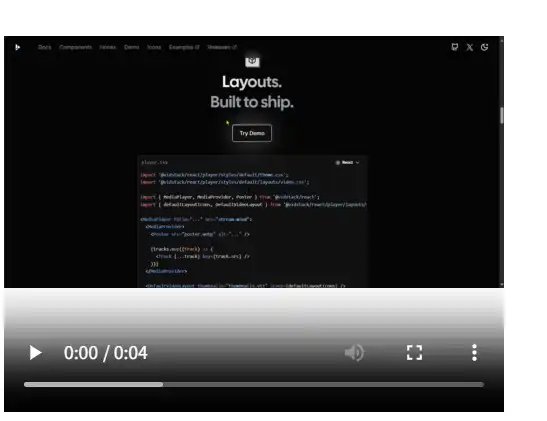
分为两个部分:
- 视频本身:width = 500,height = 250
- control:width = 500,height = 120
在给定的widht 和 height 不符合视频 aspect ratio的情况下,
the video will grow to fill the space horizontally, and the unfilled space will just be given a solid background color by default.
video 按照给定的width填充,然后按照自身的aspect ratio 设置显示的height
问:为什么control的height是120,而不是250?
- width=400,height=100:如果横向填充则容器的高度(100)小于完全显示video的高度
实际效果:
视频本身:width = 250,height = 100
在横向填充无法完全显示视频时进行垂直方向的填充
总结
- 视频在容器内完全显示
- 视频保持自身的aspect ratio
问:如果要调整video 的 aspect ration 应该如何设置?
其他
| 属性名称 | 功能 |
|---|---|
| autoplay | 重新加载页面时自动播放视频 |
| loop | 播放结束后自动重新播放 |
| muted | 默认关闭声音 |
| poster | 播放视频前显示的图片,仅在第一次播放时有效?再次播放(将进度条拖到开始 或 启用loop 或 结束后点击开始播放按钮)都不会显示该图片 |
| preload | 点击播放前如何预加载(buffering)视频 - none: 不预加载,点击播放后开始请求视频数据 - auto: buffers the media file,缓存整个视频 - metadata: buffers only the metadata for the file,获取视频的时长、第一帧画面 最终的缓存模式由浏览器决定 |
The <audio> element
<audio controls>
	<source src="/test/MELANCHOLY-Single Wang.mp3" type="audio/mp3" />
	<p>
		Your browser doesn't support this audio file. Here is a <a href="/test/MELANCHOLY-Single Wang.mp3">link to the audio</a> instead.
	</p>
</audio>
如果不设置controls,不会显示控制器。
This takes up less space than a video player, as there is no visual component
所以audio 不包含和visual component 相关的属性,如 width、height poster 等
MP3
When MPEG-1 Audio Layer III codec data is stored in an MPEG file, and there is no video track on the file, the file is typically referred to as an MP3 file, even though it's still an MPEG format file.
当 Container 为 MPEG-1,MPEG-2,MP4,且没有包含 video track时,以MP3作为文件类型,而不是容器类型
Display video text tracks
注
<track> should be placed within <audio> or <video>, but after all <source> elements.
问:对于video 和 audio 不在同一个文件(分离开),如何设置video对应的audio?
不能直接设置,需要控制video 和 audio 的播放进度同步。或者将audio 合并到video中再进行播放
问:字幕文件有多种类型,是否支持其他类型?如 srt
只支持WebVTT,其余类型的字幕文件需要转换为WebVTT类型 或 使用 js库实时解析字幕
字幕类型
| 文件后缀 | 全称 | 中文名称 | 简介 | 说明 |
|---|---|---|---|---|
| smi | 简易字幕 | Microsoft's format for Windows Media Player. Uses HTML-like markup with CSS styling and multi-language support. | ||
| srt | SubRip Subtitle | 文本字幕 | The most widely used subtitle format, compatible with virtually every video player. Uses simple numbered entries with timestamps. | |
| sub | MicroDVD | 图形字幕 | Frame-based subtitle format used in classic moive fansubbing. Requires a known video frame rate for accurate timing | 以透明背景图片形式存在的字幕,播放时将图片叠加到视频画面上 |
| ssa/ass | Substation Alpha | 特效字幕/高级特效字幕 | Advanced format popular in anime fansubbing. Supports custom fonts, colors, positioning and karaoke timing effects. | 动漫字幕 |
| vtt | Web VTT: The Web Video Text Tracks Format | Web 视频文本轨道格式 | The W3C standard for HTML5 video captions. Supports CSS styling, cue positioning and speaker indentification. | |
| sbv | SubViewer | YouTube's native caption format. Exported from YouTube Studio when downloading auto-generated or manual captions | ||
| stl | Spruce/EBU STL | Professional broadcast subtitle format for television production. The EBU variant is the European standard for TV subtitling. | ||
| ttml | Timed Text Markup Language | XML-based W3C standard used by Netflix, BBC and streaming platforms. Also known as DFXP. Professional broadcast quality. |