Creating links
Creating links
What is a hyperlink?
Hyperlinks are features of an HTML document that, when clicked or otherwise activated, cause the browser to navigate to other documents or resources, sometimes specific parts of documents.
Each resource on the web has an address, known as a URL(Uniform Resource Locator), which hyperlinks point to.
- navigate: 过程。在浏览器中打开一个hyperlink时,可能会创建一个新的标签页。或者当前页面跳转到hyperlink指向的页面。
- activated:触发方式。鼠标点击
- documents or resources, specific parts of documents:指向的目标可以是一个页面,也可以是其他内容
- resources: 点击链接下载文件
- parts of documents <=> document fragments:例如 heading
- web中的所有文件都是通过URL定位,hyperlink 使用 URL 确定目标的位置
Anatomy of a link
<p>
<a href="https://developer.mozilla.org/en-US/">链接到mdn</a>
</p>
<a href="https://developer.mozilla.org/en-US/">
<h2> make a heading element a link </h2>
</a>
<a href="https://developer.mozilla.org/en-US/">
<img src="./attachments/Creating%20links.webp" />
</a>
测试用的图片
- 一个普通链接:在content中说明 链接目标的信息
- 可以将其他element(如heading、img) 放到a中作为 触发链接的容器/介质/戒指?
如果a中有其他element,仍定义content,此时哪一个部分会触发 navigation?
<a href="https://developer.mozilla.org/en-US/">content
<h2>h2</h2>
</a>
...vue 中报错:\[plugin:vite:vue] Element is missing end tag.
content 和 element(示例中为h2)作为一个整体
Adding supporting information
<a href="https://developer.mozilla.org/en-US/" title="Documenting CSS,HTML, and Js, since 2005">mdn</a>鼠标悬停在link上时显示title内容
Document fragments
Mailing address
mailing address<h2 id="mailing_address">Mailing address</h2>
<a href="#mailing_address">mailing address</a>Elements with an id attribute in the document automatically create a document fragment that can be linked to.
- 对要链接的fragment设置id attribute
- 使用文件名#id 进行链接
- 如果是链接到当前文件的fragment,文件名可以省略
Linking to a download
<a href="/README.md">未指定默认名称的链接</a>
<a href="/README.md" download="test.md">下载文件,指定名称</a>
<a href="/README.md" download="">下载文件,未指定名称</a>- 当链接指向的是文件时,点击链接默认在浏览器中打开文件
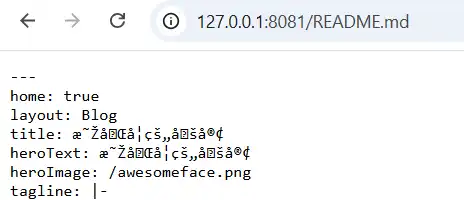
- 如果需要下载文件,使用download指定下载文件的默认名称(test.md)
- 如果download attribute的值为空,则默认名称为要下载的文件本身(README.md)

URLs and paths
一个项目的结构示例:
/
	README.md
	[test]
		contacts.html
		index.html
		[pdfs]
			project-brief.pdf
		[projects]
index.html- test: 项目的存储/起始位置
- /: root
- [pdfs]: 名称为pdfs的目录
| 当前 | 目标 | 链接 |
|---|---|---|
| /test/index.html | /test/contacts.html | contacts.html ./contacts.html |
| /test/index.html | /test/projects/index.html | projects/index.html |
| /test/projects/index.html | /test/pdfs/project-brief.pdf | ../pdfs/project-brief.pdf |
| 项目中的任意html | /test/contacts.html | /contacts.html |
- 默认以当前文件所在位置为起点查找链接目标
- 处于同一目录下可以直接输入目标文件名称
- ./:显式指定当前路径
- ../:上一级目录
- /:项目的起始目录(root directory)
问:对于root directory之外的文件能否访问?如示例中的README.md
Linking with full URLs
链接到站点外部文件时使用full URLs
包含
- https:协议
www.some-other-site.com:domain
The default index.html page
Web servers look for a default landing page called
index.htmlwhen a filename isn't specified.
查看MDN的主页,full URL - /en-US/ 中是没有包含html文件名称的: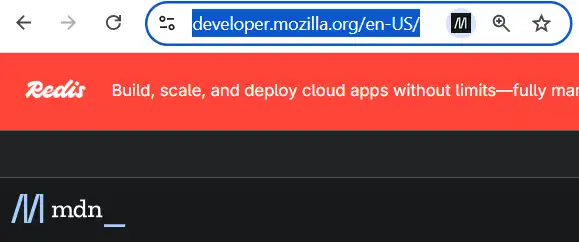
如果手动添加index.html,可以发现能够访问到相同的页面: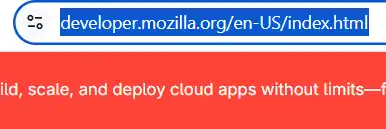
对于没有指定文件名(只指定了目录),servers 默认要访问的是index.html。如果没有对应的html,应该会报错。
注
The trailing slash(/) at the end of the URL is important
注意区分文件 及 目录
- 文件:没有 the trailing slash(/)结尾
- 目录:有/结尾
Link best practices
When to open links in a new tab
<a href="https://developer.mozilla.org/en-US/">open in the same tab as the page they are on</a>
<a href="https://developer.mozilla.org/en-US/" target="_blank">open link in a new tab</a>
设置target attribute为_blank在new tab 中打开链接
same tab: navigate back to the previous page
使用场景:- 小说阅读
能够保持阅读的连贯性
- 小说阅读
new tab: parallel navigation experience
使用场景:
A common approach is to open external links in new tabs and internal links in the same tab.
对于在new tab打开的links,可以使用icon标识
问:有的网站不符合使用的习惯能不能修改打开的方式?