Table basics
2026/8/11大约 2 分钟
Table basics
Creating your first table
| first cell | second cell | third cell | fourth cell |
Demo
<table>
<td>first cell</td>
<td>second cell</td>
<td>third cell</td>
<td>fourth cell</td>
</table>- table: 容纳所有表格相关的内容
- td: table data,每个td element 代表/对应 一个 table cell
- cells are automatically aligned with each other on the same row
创建多行
| (0,0) | (0,1) |
| (1,0) | (1,1) |
Demo
<table>
	<tr>
		<td>(0,0)</td>
		<td>(0,1)</td>
	</tr>
	<tr>
		<td>(1,0)</td>
		<td>(1,1)</td>
	</tr>
</table>- tr: table row,将同一行内的cell放到一个tr内
如果不同行内cell数量不一致时,结果如何?
| (0,0) | |
| (1,0) | (1,1) |
Demo
<table>
	<tr>
		<td>(0,0)</td>
	</tr>
	<tr>
		<td>(1,0)</td>
		<td>(1,1)</td>
	</tr>
</table>- 每个cell都有边框,对应位置没有cell时,没有内容
Adding headers with <th> elements
| Name | Mass(1024kg) | Diameter |
|---|---|---|
| Mercury | ...........0.330........... | 4.879 |
Demo
<table>
	<tr>
		<th>Name</th>
		<th>Mass(10<sup>24</sup>kg)</th>
		<th>Diameter</th>
	</tr>
	<tr>
		<th>Mercury</th>
		<td>...........0.330...........</td>
		<td>4.879</td>
	</tr>
</table>- th: table header
This works in exactly the same way as a <td>, except that it denotes a header, not a normal cell
- table headings come with some default styling - bold and centered
Allowing cells to span multiple rows and columns
| Animals |
|---|
Demo
<table>
<tr>
<th colspan="2">Animals</th>
</tr>
<tr>
	<th colspan="2">Hippopotamus</th>
</tr>

<tr>
	<th rowspan="2">Horse</th>
	<td>Mare</td>
</tr>

<tr>
	<td>Stallion</td>
</tr>
</table>- 通过rowspan 和 colspan指定合并单元格跨越的行、列数
- 在合并单元格的首个(右上角)cell内指定rowspan、colspan
- 被合并的cell无需再次定义《=》每一行的首个td/th 是单个cell 或 合并后的单元格的首个cell
Grouping columns with <colgroup> and <col>
对某一列中的所有cell应用样式
| Mon | Tues | Wed |
|---|
Demo
<table>
<colgroup>
<col span="2"/>
<col class="column-background"/>
<col style="border: 4px solid #c1437a; background-color: #dbc097"/>
</colgroup>
<tr>
<td> </td>
<th>Mon</th>
<th>Tues</th>
<th>Wed</th>
</tr>
<tr>
	<th>1st period</th>
	<td>English</td>
	<td>Dutch</td>
	<td>German</td>
</tr>

<tr>
	<th>2nd period</th>
	<td>German</td>
	<td>Dutch</td>
	<td>English</td>
</tr>
</table>
<style>
.column-background {
background-color: #97db9a;
}
</style>效果:
ob
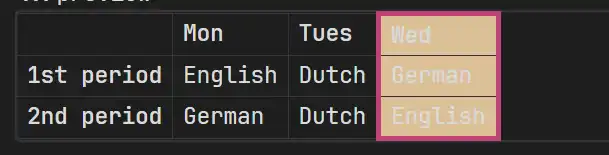
边框有效果
web
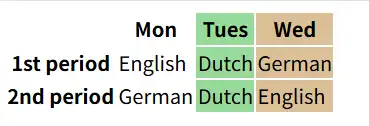
边框样式未生效
- :Non-Breaking Space,对于没有内容的cell,确保显示其边框
- colgroup: defines a group of columns within a table.
- col: defines one or more columns in a column group represented by its parent
colgroup> elemen. Thecolelement is only valid as a child of acolgroupelement that has no span attribute defined.- 通过span指定跨越的列数 - 长度
- 在一个colgroup中,col总是从第1列(起始列)开始。由于col只提供了span-长度,还需要确定其到起始的距离。这个距离是通过它前面的col的长度确定的。所以对于不需要样式的列,也要列出来并指定span。如示例中第一、二列 需要指定col span="2"
- span 默认为 1
- 由于col的语义:colgroup内的col,同时col的位置和其他col有关联,所以必须将其放在colgroup中才有效?
- 可以在col中通过style属性指定样式 - inlin styles,也可以设置class, target with CSS or Js
问:既然有colgroup,那么有rowgroup吗?如何设置跨越多行所有cell的样式?