1.2 Creating a window
1.2 Creating a window
IDE:Qt Creator 14.0.2
Compiler:mingw1310_64
深入了解:
- GLAD的处理过程
GLFW
[!quote]
GLFW is a library, written in C. It allows us to create an OpenGL context, define window parameters, and handle user input.
complication
- 下载源代码
- 打开cmake gui 工具
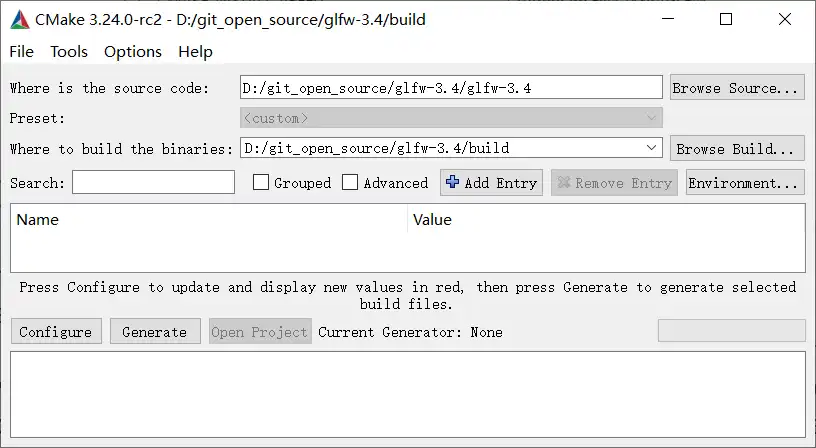
where is source code:下载的源代码中README 所在路径
where to build the binaries:编译后相关文件(库)存放路径 - 配置编译器:点击Configure按钮
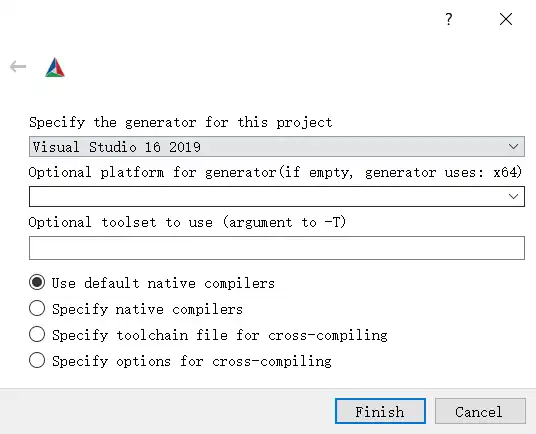
generator:visual studio 版本
platform:默认windows x64
use default native compilers:默认本地编译器
点击finish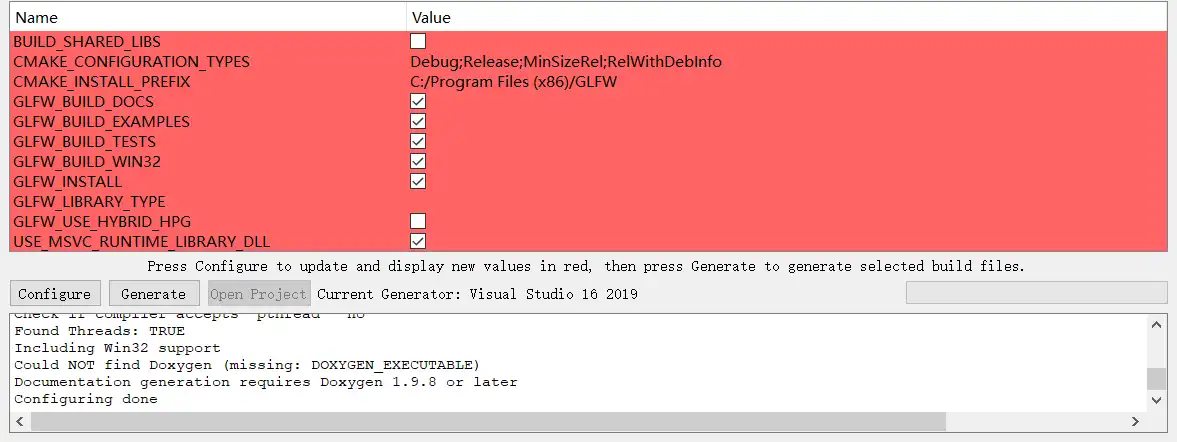
表格中是一些编译选项,把第一项 BUILD_SHARED_LIBS 勾选上
点击Generate后在where to build the binaries 下生成项目文件
- 生成动态库:打开解决方案sln,运行。编译成功后在src/Debug 下生成glfw3.dll

创建工程
cmake_minimum_required(VERSION 3.0)

set(CMAKE_CXX_STANDARD 14)
set(CMAKE_CXX_STANDARD_REQUIRED TRUE)

project(learnOpenGL)
add_executable(learnOpenGL main.cpp)
链接
工程路径下新建lib、includes 文件夹
将源文件中includes下的GLFW 拷贝到工程的includes下。
将编程生成的glfw3.dll拷贝到工程的lib下。
修改CMakeLists.txt添加头文件路径及链接库
target_include_directories(learnOpenGL PRIVATE ${CMAKE_SOURCE_DIR}/includes)

target_link_libraries(learnOpenGL PUBLIC ${CMAKE_SOURCE_DIR}/lib/glfw3.dll)
GLAD
[!quote]
Since there are many different versions of OpenGL drivers, the location of most of its functions is not known at compile-time and needs to be queried at run-time.
openGL接口调用过程:
opengl.dll 中只包含部分实际接口函数的地址,应用程序要调用接口需要先获取接口函数的地址,然后通过函数指针进行调用。
“opengl.dll 负责把api 调用转发给显卡驱动”
获取一个接口函数地址的实现:
// define the function's prototype
typedef void (*GL_GENBUFFERS) (GLsizei, GLuint*);
// find the function and assign it to a function pointer
GL_GENBUFFERS glGenBuffers  = (GL_GENBUFFERS)wglGetProcAddress("glGenBuffers");
// function can now be called as normal
unsigned int buffer;
glGenBuffers(1, &buffer);| 行号 | 功能 | 说明 |
|---|---|---|
| 2 | 函数指针类型定义 | 类型名称GL_GENBUFFERS |
| 4 | 查找驱动中的名称为glGenBuffers的接口函数的地址 | |
| 7 | 使用glGenBuffers | 通过定义的函数指针对象进行函数调用 |
所有使用的OpenGL接口都要进行上面获取函数地址的过程
Setting up GLAD
glad.dav1d.de
选项配置:
- Language: C/C++
- Specification:OpenGL
- API gl:大于3.3
- Profile:Core
- Options:勾选Generate a loader
点击generate 后跳转到下载页面:
下载zip
解压后结构
include
	glad
		glad.h
	KHR
		khrplatform.h
src
	glad.c
将include 下的两个文件夹拷贝到工程下的includes
将glad.c 添加到工程中
使用
#include <glad/glad.h>
#include <GLFW/glfw3.h>
注
glad 的头文件要在 glfw 头文件前添加