1.4 Hello Triangle
1.4 Hello Triangle
- openGL 的大部分工作是将3D坐标转变2D像素
- 通过 graphics pipeline 完成转换
- 转换过程可以划分为两个部分:将3D坐标转换为2D坐标;将2D坐标转换为像素
- graphics pipeline 可以划分为6个步骤,每个步骤的输入是上一个步骤的输出
- 一些步骤(Shader)可以设定为自己编写的程序
- Shaders are written in the OpenGL Shading Language (GLSL)
- 可以设置绘制的形状类型(数据的结构)如给定3个点可以绘制成一个三角形,也可以绘制成两条线段
- Those hints are called
primitives - Some of these hints are GL_POINTS, GL_TRIANGLES and GL_LINE_STRIP
- Those hints are called
pipeline 流程: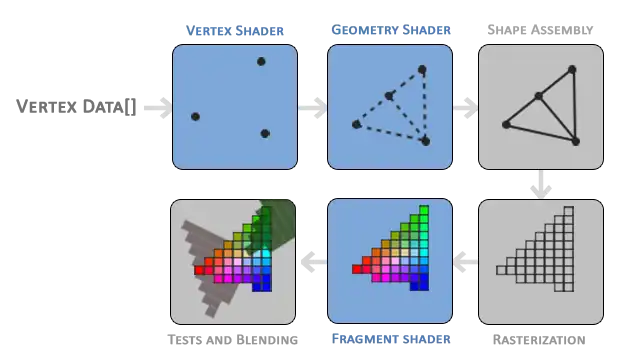
| step | name | 中文名 | 作用 | configurable;可选? | 说明 |
|---|---|---|---|---|---|
| 1 | VERTEX SHARDER | 顶点着色器 | 1. transform 3D coordinates into different 3D coordinates 2. some basic processing on the vertex attributes | Y | |
| 2 | GEOMETRY SHADER | 几何着色器 | has the ability to generate other shapes by emitting new vertices to form new primitives | Y;Y | 额,示例上看vertex shader 传递过来3个顶点,在这里增加了一个顶点 |
| 3 | SHAPE ASSEMBLY | 图元装配 | form one or more primitives and assembles all the point(s) in the primitive shape given | N | 4个顶点构成了2个triangles |
| 4 | RASTERIZATION | 光栅化 | 1. it maps the resulting primitive(s) to the corresponding pixels on the final screen 2. Clipping discards all fragments that are outside your view | N | |
| 5 | FRAGMENT SHADER | 片段着色器 | calculate the final color of a pixel | Y | |
| 6 | TESTS AND BLEDING | 测试与混合 | checks the corresponding depth value of the fragment checks for alpha values and blends the objects accordingly. | N |
NDC - Normalized Device Coordinates
OpenGL 使用NDC 坐标系进行绘制。
坐标系定义
[!quote]
the positive y-axis points in the up-direction and the (0,0) coordinates are at the center of the graph
原点在图像中心,x向右为正,y向上为正。坐标范围 [-1.0,1.0],超出范围不会显示
通过glViewport 可以将 NDC 坐标转化为 screen-space coordinates, screen-space 是在glfw 中指定的OpenGL 渲染宽口。
Vertex input
[!quote]
To start drawing something we have to first give OpenGL some input vertex data.
步骤:
- define vertices in normalized device coordinates in a float array
- creating memory on the GPU where we store the vertex data
- configure how OpenGL should interpret the memory
- specify how to send the data to the graphics card
define vertices
实现:
float vertices[] = {
    -0.5f, -0.5f, 0.0f,
     0.5f, -0.5f, 0.0f,
     0.0f,  0.5f, 0.0f
};
使用NDC坐标;浮点类型;
因为是表示3维坐标,每个vertex 用3个坐标值定义,依次是x,y,z。
creating memory on the GPU
使用 vertex buffer objects (VBO) 存储GPU 内存中的vertices
因为CPU 传递 数据给GPU的速度非常满,所以尽量一次性将所有要用到的数据发送给GPU,让GPU存储。shader 获取GPU中的数据速度非常快。
实现:
unsigned int VBO;
glGenBuffers(1, &VBO);| 行号 | 功能 | 说明 |
|---|---|---|
| 1 | 存放VBO id | |
| 2 | 生成VBO对象 | 可以一次性创建多个VBO对象,第一个参数是定义的VBO对象的数量,第二个参数是存放VBOid的地址 |
send data
在发送数据前,需要先bind VBO
实现:
void glBindBuffer(	GLenum target,GLuint buffer);
glBindBuffer(GL_ARRAY_BUFFER, VBO);| 参数 | 值 | 说明 |
|---|---|---|
| target | GL_ARRAY_BUFFER | OpenGL has many types of buffer objects, GL_ARRAY_BUFFER 表示 vertex buffer |
| buffer | VBO | 要绑定的VBO id |
所有针对GL_ARRAY_BUFFER的操作都是基于当前bind的 buffer。
发送:
void glBufferData(	GLenum	target,
GLsizeiptr	size,
const GLvoid *	data,
GLenum	usage);

glBufferData(GL_ARRAY_BUFFER, sizeof(vertices), vertices, GL_STATIC_DRAW);
[!quote]
glBufferData is a function specifically targeted to copy user-defined data into the currently bound buffer.
| 参数 | 值 | 用途 | 说明 |
|---|---|---|---|
| target | GL_ARRAY_BUFFER | type of the buffer we want to copy data into | |
| size | sizeof(vertices) | specifies the size of the data (in bytes) we want to pass to the buffer | |
| data | vertices | the actual data we want to send | |
| usage | GL_STATIC_DRAW | how we want the graphics card to manage the given data | 数据变化的频率,这里的值表示不会变化 |
问:所以调用glBufferData 后才会在GPU中分配对应buffer使用的内存?bind 新的buffer 后之前的buffer 怎么样了,是被释放了?
每个对象都有自己的显存,传递数据只针对当前绑定的对象。调用glDeleteBuffers 释放。
| 值 | 含义 | 说明 |
|---|---|---|
| GL_STREAM_DRAW | the data is set only once and used by the GPU at most a few times | 只设置一次(数据不会发生变化),最多使用几次(频率低) |
| GL_STATIC_DRAW | the data is set only once and used many times | |
| GL_DYNAMIC_DRAW | the data is changed a lot and used many times. |
问:对于经常变化的数据,每次如何更新数据?还是需要再glBufferData?
Vertex shader
writing a shader
vertex shader的目的:
[!quote]
transform the input data to coordinates that fall within OpenGL's visible region.
最简单的vertex shader程序:
#version 330 core
layout (location = 0) in vec3 aPos;

void main()
{
    gl_Position = vec4(aPos.x, aPos.y, aPos.z, 1.0);
}| 行号 | 功能 | 说明 |
|---|---|---|
| 1 | declaration of its version | 当前使用3.3 版本 及 core profile functionality |
| 2 | declare all the input vertex attributes | in 表示 input;vec 是 vector的缩写,是GLSL 语言定义的数据类型,后面的3是vector 的维度-3维向量。 Layout (location = 0) 说明 attribute 的序号 |
| 4 | 函数起始 | |
| 5 | 设置vertex shader的输出 | gl_Position 是 predefined 的变量,它的类型是vec4 vector 最大维数是1,每个维度的值的名称依次是x, y, z, w,通过下标运算符+名称访问对应的值。 将aPos的值拷贝到gl_Position, 并设置gl_Position的w为 1.0 |
Compiling a shader
编译的过程:
- create a shader object
unsigned int vertexShader;
vertexShader = glCreateShader(GL_VERTEX_SHADER);
shader 有多种类型,这里使用GL_VERTEX_SHADER表示要创建的是vertex shader
- 将vertex shader 存储到 c字符串中
const char *vertexShaderSource = "#version 330 core\n"
    "layout (location = 0) in vec3 aPos;\n"
    "void main()\n"
    "{\n"
    "   gl_Position = vec4(aPos.x, aPos.y, aPos.z, 1.0);\n"
"}\0";- attach the shader source code to the shader object and compile the shader
glShaderSource(vertexShader, 1, &vertexShaderSource, NULL);
glCompileShader(vertexShader);
source code 可以分为多段,编译前将其拼接到一起。最后一个参数的含义是字符串的长度数组,设置为NULL,表示每段字符都是以\0结尾。
错误处理
int  success;
char infoLog[512];
glGetShaderiv(vertexShader, GL_COMPILE_STATUS, &success);

if(!success)
{
    glGetShaderInfoLog(vertexShader, 512, NULL, infoLog);
    std::cout << "ERROR::SHADER::VERTEX::COMPILATION_FAILED\n" << infoLog << std::endl;
}| 行号 | 功能 | 说明 |
|---|---|---|
| 1 | 出错的标志 | |
| 2 | 存储错误信息 | |
| 3 | 获取shader的编译状态参数 | GL_COMPILE_STATUS: 编译状态参数,还有其他参数,如:GL_SHADER_TYPE |
| 7 | 获取错误日志 | |
| 8 | 打印日志 |
Fragment Shader
[!quote]
The fragment shader is all about calculating the color output of your pixels.
Color
使用RGBA 表示颜色,其中RGB 分别代表Red、Green 和 Blue 三原色,A是Alpha,来源于线性插值方程αA + (1-α)B 中系数α,表示不透明度。100%不透明,那么在它后面的颜色无法显示。0%不透明 《=》完全透明,不会显示当前颜色。介于0%~100% 会混合它后面的颜色
通过每种颜色(包括透明度)的取值范围是[0,255],但在OpengGL中颜色的取值范围是[0,1]
问:颜色值的具体含义是什么?光(波)的波长(频率)决定了光的颜色,那么是不是一定范围内的波长对应了一种颜色,然后这一段就对应颜色的取值范围?
writing
#version 330 core
out vec4 FragColor;
void main()
{
	FragColor = vec4(1.0f, 0.5f, 0.2f, 1.0f);
}| 行号 | 功能 | 说明 |
|---|---|---|
| 2 | 定义输出的颜色对象 | 用vec4类型存储RGBA值 |
| 5 | 设置输出颜色 | 固定为橙黄色,不透明 |
Compiling
和vertex shader一样
unsigned int fragmentShader; fragmentShader = glCreateShader(GL_FRAGMENT_SHADER); glShaderSource(fragmentShader, 1, &fragmentShaderSource, NULL); glCompileShader(fragmentShader);Shader Program
[!quote]
A shader program object is the final linked version of multiple shaders combined. It links the outputs of each shader to the inputs of the shader.
- creating a program object:
unsigned int shaderProgram;
shaderProgram = glCreateProgram();- link shaders
glAttachShader(shaderProgram, vertexShader); glAttachShader(shaderProgram, fragmentShader); glLinkProgram(shaderProgram);按管线处理顺序链接shader
- 检查是否链接成功
glGetProgramiv(shaderProgram, GL_LINK_STATUS, &success);
if(!success) {
    glGetProgramInfoLog(shaderProgram, 512, NULL, infoLog);
    ...
}- activate program
glUseProgram(shaderProgram);- 释放已经链接的shader对象
glDeleteShader(vertexShader);
glDeleteShader(fragmentShader);
Linking Vertex Attributes
[!quote]
how it should interpret the vertex data in memory and how it should connect the vertex data to the vertex shader's attributes.
vertex data:传递给vertex shader 的数据
vertex shader's attributes: 在shader 中定义的对象
需要tell OpenGL 怎么取vertex data(从哪里取,取多少)
当前传递的vertex data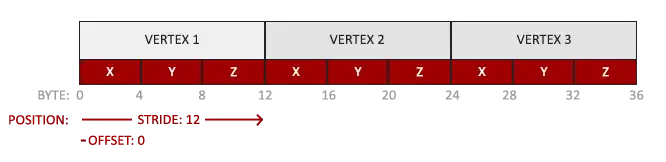
包含了3个顶点属性值
需要将其绑定到
layout (location = 0) in vec3 aPos;绑定的方法:
void glVertexAttribPointer(	GLuint	index,
GLint	size,
GLenum	type,
GLboolean	normalized,
GLsizei	stride,
const GLvoid *	pointer);

glVertexAttribPointer(0, 3, GL_FLOAT, GL_FALSE, 3 * sizeof(float), (void*)0); glEnableVertexAttribArray(0);| 参数 | 含义 | 说明 |
|---|---|---|
| index | which vertex attribute we want to configure | 和shader 中定义属性时声明的location 对应 |
| size | the size of the vertex attribute | 一个属性包含一组相同类型的数据,指定元素的大小(数量)。一个顶点坐标包含了x、y、z 3个坐标值 |
| type | the type of the data | GLSL中的数据类型。 a vec* in GLSL consists of floating point values. GLSL中 vec对应GL_FLOAT类型 |
| normalized | 是否归一化 | 这里传递的已经是归一化了的值(0~1),所以不需要,设置为GL_FALSE |
| stride | the space between consecutive vertex attributes. | vertex data中相邻属性之间的间隔大小。如果两个属性之间没有间隔(相邻)可以使用0 或者 属性的大小。这里第一个属性vertex1的地址是0,第二个属性vertex2的地址是12。两个属性之间没有间隙。间隔值可以是0 或者 属性的大小(sizeof(float * 3) |
| pointer | the offset of where the position data begins in the buffer | 首个属性在buffer 中的偏移量,需要将值转换为(void*)类型 |
设置完成后还需要enable attribute,因为 “vertex attributes are disabled by default.”
绘制一个object的过程:
// 0. copy our vertices array in a buffer for OpenGL to use
glBindBuffer(GL_ARRAY_BUFFER, VBO);
glBufferData(GL_ARRAY_BUFFER, sizeof(vertices), vertices, GL_STATIC_DRAW);
// 1. then set the vertex attributes pointers
glVertexAttribPointer(0, 3, GL_FLOAT, GL_FALSE, 3 * sizeof(float), (void*)0);
glEnableVertexAttribArray(0);
// 2. use our shader program when we want to render an object
glUseProgram(shaderProgram);
// 3. now draw the object
someOpenGLFunctionThatDrawsOurTriangle();
由于attribute 的设置没有和 VBO进行绑定(切换VBO需要重新设置attribpointer)。如果频繁切换VBO,渲染部分的代码将十分繁杂且容易出错。
Vertex Array Object
[!quote]
A vertex array object (VAO) can be bound just like a vertex buffer object and any subsequent vertex attribute calls from that point on will be stored inside the VAO.
- VAO 也是一个对象
- 绑定VAO之后,所有 vertex attribute 的设置(通过glVertexAttribPointer() )都会存储在VAO中。VAO中的array 指的是 attribute array。
- VAO还会存储 vertex attributes 关联的 VBO、attribute 的enable 及 disenable
通过VAO将 VBO 和 attribute 设置绑定在一切,切换模型时直接切换VAO,无需重新设置attribute。
使用VAO进行渲染的流程:
// ..:: Initialization code (done once (unless your object frequently changes)) :: ..
// 0.  generate a VAO Object
unsigned int VAO;
glGenVertexArrays(1, &VAO);
// 1. bind Vertex Array Object
glBindVertexArray(VAO);
// 2. copy our vertices array in a buffer for OpenGL to use
glBindBuffer(GL_ARRAY_BUFFER, VBO);
glBufferData(GL_ARRAY_BUFFER, sizeof(vertices), vertices, GL_STATIC_DRAW);
// 3. then set our vertex attributes pointers
glVertexAttribPointer(0, 3, GL_FLOAT, GL_FALSE, 3 * sizeof(float), (void*)0);
glEnableVertexAttribArray(0);

// 颜色 VBO
//glBindBuffer(GL_ARRAY_BUFFER, vbo_color);
//glBufferData(GL_ARRAY_BUFFER, sizeof(colors), colors, GL_STATIC_DRAW);
//glEnableVertexAttribArray(1);
//glVertexAttribPointer(1, 3, GL_FLOAT, GL_FALSE, 0, (void*)0);  // attribute 1 = 颜色
glBindBuffer(GL_ARRAY_BUFFER, 0);
[...]

// ..:: Drawing code (in render loop) :: ..
// 4. draw the object
glUseProgram(shaderProgram);
glBindVertexArray(VAO);
someOpenGLFunctionThatDrawsOurTriangle();| 行号 | 功能 | 说明 |
|---|---|---|
| 15-18 | 设置颜色VBO的属性配置 | 配置时针对当前bind 的VBO |
| 19 | 解除绑定 | VAO中存储的是attribPointer 以及它所关联的VBO,解除VBO的绑定表示不再对其进行配置,但是前面配置过的信息已经保存在VAO中了 |
Draw Triangle
void glDrawArrays(	GLenum mode,
 	GLint first,
 	GLsizei count);
glDrawArrays(GL_TRIANGLES, 0, 3);| 参数 | 含义 | 说明 |
|---|---|---|
| mode | the OpenGL primitive type we would like to draw | GL_TRIANGLES: 三角形 |
| first | the starting index of the vertex array we'd like to draw | 传递的VBO中包含了多个属性点,指定起始的属性点。这里从第0个开始 |
| count | how many vertices | 传递的vertices 的数量。绘制一个三角形最少需要3个顶点 |
渲染循环:
    while(!glfwWindowShouldClose(window))
    {
        processInput(window);

        // render
        // ------
        glClearColor(0.2f, 0.3f, 0.3f, 1.0f);
        glClear(GL_COLOR_BUFFER_BIT);

        glUseProgram(shaderProgram);
        glBindVertexArray(VAO); // seeing as we only have a single VAO there's no need to bind it every time, but we'll do so to keep things a bit more organized
        glDrawArrays(GL_TRIANGLES, 0, 3);

        glfwSwapBuffers(window);
        glfwPollEvents();
    }

    glDeleteVertexArrays(1, &VAO);
    glDeleteBuffers(1, &VBO);
glDeleteProgram(shaderProgram);| 行号 | 功能 | 说明 |
|---|---|---|
| 10 | 设置着色器程序 | 不同的模型可能使用不同的渲染方式 |
| 11 | 绑定VAO | 设置要传递给shader 的VBO |
| 18-20 | 释放资源 |
效果: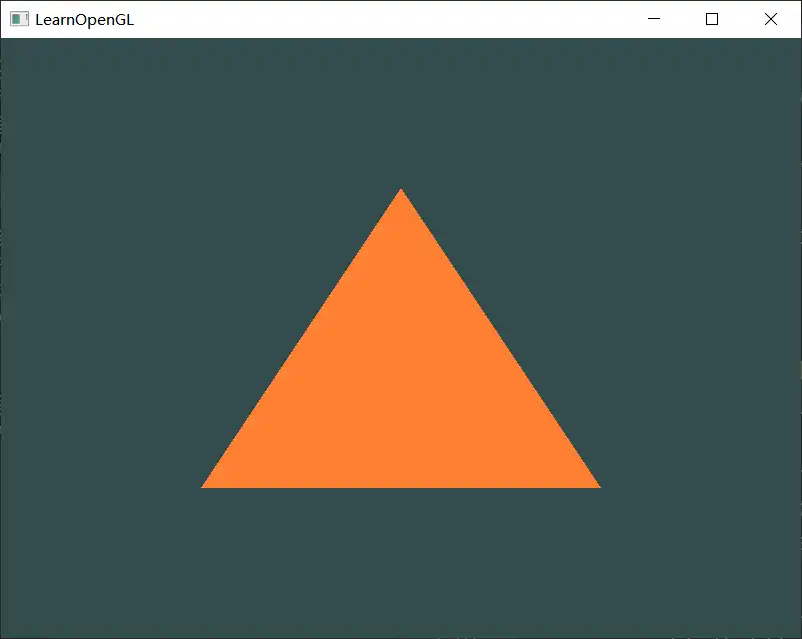
Element Buffer Objects
使用两个三角形绘制一个矩形
方法一:提供两个三角形共6个顶点
float vertices[] = {
    // first triangle
     0.5f,  0.5f, 0.0f,  // top right
     0.5f, -0.5f, 0.0f,  // bottom right
    -0.5f,  0.5f, 0.0f,  // top left
    // second triangle
     0.5f, -0.5f, 0.0f,  // bottom right
    -0.5f, -0.5f, 0.0f,  // bottom left
    -0.5f,  0.5f, 0.0f   // top left
};
第一个triangle 的 bottom right、top left 顶点和第二个 triangle重复。
方法二:提供唯一的顶点,然后指定三角形使用的顶点
[!quote]
An EBO is a buffer, just like a vertex buffer object, that stores indices that OpenGL uses to decide what vertices to draw.
配合VBO进行绘制
float vertices[] = {
     0.5f,  0.5f, 0.0f,  // top right
     0.5f, -0.5f, 0.0f,  // bottom right
    -0.5f, -0.5f, 0.0f,  // bottom left
    -0.5f,  0.5f, 0.0f   // top left
};
unsigned int indices[] = {  // note that we start from 0!
    0, 1, 3,   // first triangle
    1, 2, 3    // second triangle
};
按顺序指定要使用的VBO中的顶点的index,index 从0开始
在VAO中也存储EBO,配合VAO 使用:
// ..:: Initialization code :: ..
unsigned int EBO;
glGenBuffers(1, &EBO);
// 1. bind Vertex Array Object
glBindVertexArray(VAO);
// 2. copy our vertices array in a vertex buffer for OpenGL to use
glBindBuffer(GL_ARRAY_BUFFER, VBO);
glBufferData(GL_ARRAY_BUFFER, sizeof(vertices), vertices, GL_STATIC_DRAW);
// 3. copy our index array in a element buffer for OpenGL to use
glBindBuffer(GL_ELEMENT_ARRAY_BUFFER, EBO);
glBufferData(GL_ELEMENT_ARRAY_BUFFER, sizeof(indices), indices, GL_STATIC_DRAW);

// ..:: Drawing code (in render loop) :: ..
glUseProgram(shaderProgram);
glBindVertexArray(VAO);
glDrawElements(GL_TRIANGLES, 6, GL_UNSIGNED_INT, 0);
glBindVertexArray(0);| 行号 | 功能 | 说明 |
|---|---|---|
| 16 | 根据EBO从VBO中取vertex |
void glDrawElements(	GLenum mode,
GLsizei count,
GLenum type,
const GLvoid * indices);| 参数 | 含义 | 说明 |
|---|---|---|
| mode | Specifies what kind of primitives to render. | |
| count | the count or number elements we'd like to draw | vertices 数量 |
| type | the type of the indices | |
| indices | specify an offset in the EBO | 起始点的偏移量(下标) |
效果:
Wireframe mode
设置OpenGL 绘制的图元类型为线框模式
glPolygonMode(GL_FRONT_AND_BACK, GL_LINE);效果: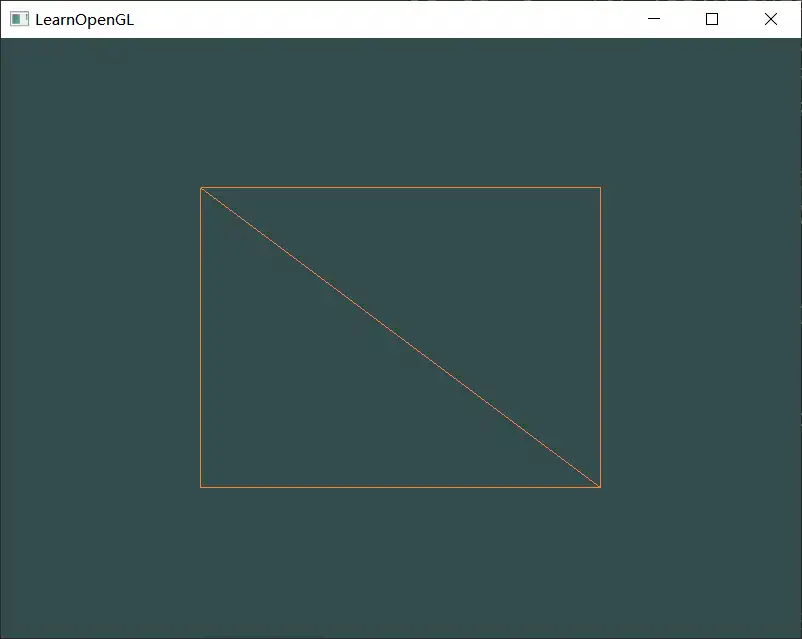
能够看到矩形是由两个三角形构成的。