1.6 Textures
1.6 Textures
[!quote]
A texture is a 2D image (even 1D and 3D textures exist) used to add detail to an object.
为了显示真实的图像,可以创建大量的顶点,然后给定每个顶点的颜色。但是这样会产生大量额外的开销,相当于将一个模型划分为一小块一小块,多出来顶点,以及顶点对应的颜色属性。
另一种方法是按照模型绘制出边界,然后将texture-图像 按照指定的范围进行贴图。这样分工明确,texture 负责描述物体样貌,vertex 负责绘制物体轮廓,也没有额外的开销。
将下面的城墙贴到triangle上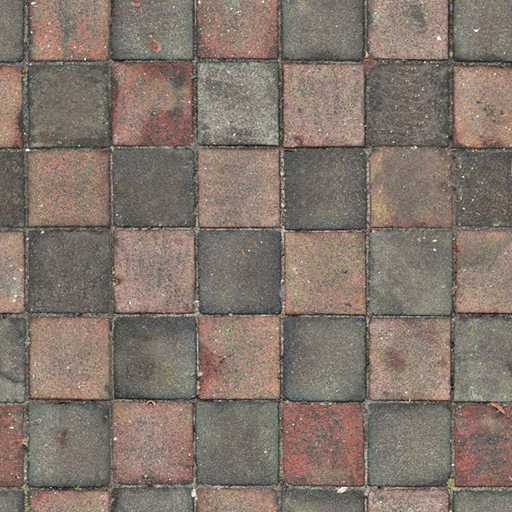
图像的分辨率(像素)是 512 x 512
texture coordinate
[!quote]
In order to map a texture to the triangle we need to tell each vertex of the triangle which part of the texture it corresponds to.
给定的textur是正方形,而它要贴到一个triangle,需要知道把哪一部分贴上去也就是triangle中的vertex对应 texture 中的点
texture coordinate:原定在左下角,x正方向向右,y正方向向上。坐标点的范围:0~1
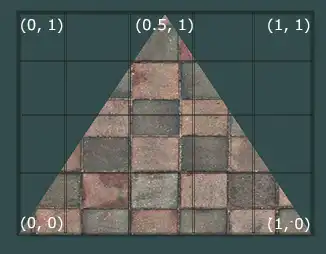
triangle 的vertex 对应的texture coordinate 为:
float texCoords[] = {
    0.0f, 0.0f,  // lower-left corner
    1.0f, 0.0f,  // lower-right corner
    0.5f, 1.0f   // top-center corner
};
sampling
[!quote]
Retrieving the texture color using texture coordinates is called sampling.
texture 的大小只有512 x 512,显示的triangle 大小(包含的像素)不固定,如何知道triangle 中的fragment 的color?
通过vertex 对应的 texture coordinate 确定每个fragment在texture中的coordinate,然后再获取对应的color。
问:fragment 和 texture coordinate的对应关系
Texture Filtering
[!quote]
Texture coordinates do not depend on resolution but can be any floating point value, thus OpenGL has to figure out which texture pixel (also known as a texel) to map the texture coordinate to.
texture coordinates 的值 不和 像素对应。比如对于上面512 x 512 的texture,并不是将x划分为512等分,然后coordinate的x只能是1/512 的倍数。coordinate可以是任意的浮点值。
表格原理一栏的图示中,四个pixel,从左上角顺时针开始数,color依次是:
- (89, 113, 193)
- (45, 59, 103)
- (47, 72, 40)
- (121, 155, 151)
| 类型 | 名称 | 原理 | sampled color |
|---|---|---|---|
| GL_NEAREST | nearest neighbor or point filtering 默认过滤方式 |  十字线是coordinate对应的位置,可以看到它落在左上角pixel的区域。选择离pixel 中心点距离coordinate最近的pixel 的颜色作为 sampled color | (89, 113, 193) |
| GL_LINEAR | linear filtering |  根据coordinate附近pixel中心到 coordinate的距离,按比例混合pixel的颜色。可以看到最终的sampled color不同于临近任何一个pixel,但是 和左上角的pixel颜色最接近 | (67, 110, 125) |
问:相邻pixel是不是有边界线,边界线上的color 区别于两侧pixel的color?如果coordinate落在了边界上那么对于GL_NEAREST 该如何采样?
两种过滤方式的效果差异:
when using a texture with a low resolution on a large object
在一个large object 上显示低分辨率的texture,texture is therefore scaled upwards ,texture 中一个像素在object 中对应多个像素。
左侧使用nearest filtering 看起来更清晰,可以看到像素颗粒。右侧使用linear filtering 看起来比较模糊,基本看不出像素点,更加真实。
在进行 放大、缩小操作时可以设置过滤方式:
glTexParameteri(GL_TEXTURE_2D, GL_TEXTURE_MIN_FILTER, GL_NEAREST);
glTexParameteri(GL_TEXTURE_2D, GL_TEXTURE_MAG_FILTER, GL_LINEAR);
MipMaps - 多级渐远纹理
将一个high solution的texture 贴到一个 small object上时,由于用来显示像素点有限,如果直接按照pixel在texture上的坐标进行采样,那么相邻的pixel 对应的 texel 跨距可能很大,最终图片的效果看起来存在跳变以及失真的情况。
产生的条件:
- 缩小图片:相当于增加距离,最终的结果都是用来显示图片的fragment 减小
- 增加图片距离
[!quote]
Mipmaps is basically a collection of texture images where each subsequent texture is twice as small compared to the previous one.
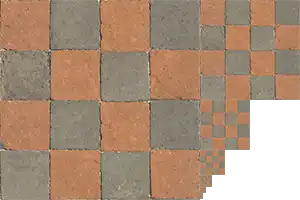
根据原texture生成一些texture,每个texture宽、高都是上一个texture的一半,直到大小为1x1的texture。放大(小于等于原texture)、缩小时使用和object(fragment) 匹配的texture。
[!quote]
When switching between mipmaps levels during rendering OpenGL may show some artifacts like sharp edges visible between the two mipmap layers.
没搞懂什么意思
参考deepseek:
- mipmaps levels之间差异明显,如原texture 是1024 x 1024,下一级别为512 x 512.等级之间没有过渡(是离散的)。
- 物体上某一区域,相邻的位置两侧可能会采用不同的level(fragmen 获取颜色的过程是先判断距离,决定采用的texture,然后再根据texture coordinate获取颜色?这样才有使用同一个texture的不同mipmaps level -》Mipmap level的选择是基于每个fragment 还是 整个物体?)。那么不同level的分界处差异明显。
所以mipmaps levels 的切换也需要过滤
| 类型 | 说明 | 效果 |
|---|---|---|
| GL_NEAREST_MIPMAP_NEAREST | takes the nearest mipmap to match the pixel size and uses nearest neighbor interpolation for texture sampling. 前面的GL_NEAREST说明的是单个mipmap的texture 的采样方式:临近插值,后面的MIPMAP_NEAREST说明的是两个mipmap之间如何采样,这里选取最接近的mipmap | |
| GL_LINEAR_MIPMAP_NEAREST | ||
| GL_NEAREST_MIPMAP_LINEAR | 假设fragment的level 值为 2.3,那么它处在level2 和 level 3 之间。在level2、3上分别进行一次采样,采样方式为NEAREST,得到color2 和 color3.然后根据 level值,按照LINEAR方式计算最终的颜色 | |
| GL_LINEAR_MIPMAP_LINEAR | 在level2、3上进行采样时采用LINEAR的方式 |
设置:
glTexParameteri(GL_TEXTURE_2D, GL_TEXTURE_MIN_FILTER, GL_LINEAR_MIPMAP_LINEAR);
glTexParameteri(GL_TEXTURE_2D, GL_TEXTURE_MAG_FILTER, GL_LINEAR);
mipmap 过滤只在缩小时起作用
Loading and creating textures
stb_image.h
[!quote]
stb_image.h is a very popular single header image loading library by Sean Barrett
使用:
#define STB_IMAGE_IMPLEMENTATION
#include "stb_image.h"

    int width, height, nrChannels;
    unsigned char *data = stbi_load("container.jpg", &width, &height, &nrChannels, 0);
stbi_image_free(data);| 行号 | 功能 | 说明 |
|---|---|---|
| 1 | 声明该宏 stb头文件中的实现代码才有效 | |
| 2 | 头文件包含 | |
| 4 | 获取图片大小以及颜色通道数量 | |
| 5 | 加载图片数据 | |
| 6 | 释放内存 | 将图片数据传递给texture后需要释放内存 |
Generating a texture
unsigned int texture;
glGenTextures(1, &texture);

glBindTexture(GL_TEXTURE_2D, texture);

glTexImage2D(GL_TEXTURE_2D, 0, GL_RGB, width, height, 0, GL_RGB, GL_UNSIGNED_BYTE, data);
glGenerateMipmap(GL_TEXTURE_2D);| 行号 | 功能 | 说明 |
|---|---|---|
| 1、2 | 生成texture object | |
| 4 | bind | 2D:texture的类型。 |
| 6 | 将图片数据传递给texture | |
| 7 | 让OpenGL生成mipmap |
void glTexImage2D(	GLenum target,
GLint level,
GLint internalFormat,
GLsizei width,
GLsizei height,
GLint border,
GLenum format,
GLenum type,
const GLvoid * data);| 参数 | 值 | 用途 | 说明 |
|---|---|---|---|
| target | GL_TEXTURE_2D | specifies the texture target; generate a texture on the currently bound texture object at the same target | 不是很懂,texture 和 texture object,前者表示数据?相当于存储在GPU中的图片? 函数没有传递texture object ID,设置是针对当前bind 的texture。除了2D,还有1D、3D。。。指定为2D就是对bound 2D texture进行设置。 |
| level | 0 | specifiers the mipmap level for which we want to create a texture | 如果要自己设置mipmap level对应的texture,那么需要设置该参数 |
| internalFormat | GL_RGB (GL_RG8I, GL_RG8UI) | what kind of format we want to store in the texture | 输出的texture 数据格式。 问:输入 与 输出之间有什么限制? |
| width | width | sets the width and height of the resulting texture | 这个必须和source image 大小一致吧? |
| height | height | ||
| border | 0 | always be 0 | 历史遗留问题 |
| format | GL_RGB | format of the source image | |
| type | GL_UNSIGNED_BYTE | datatype of the source image | |
| data | data | actual image data |
Applying texture
- 准备顶点数据 以及 对应的texture coordinate
    float vertices[] = {
         // positions       // colors           // texture coords
         0.5f,  0.5f, 0.0f, 1.0f, 1.0f,   // top right
         0.5f, -0.5f, 0.0f, 1.0f, 0.0f,   // bottom right
        -0.5f, -0.5f, 0.0f, 0.0f, 0.0f,   // bottom left
        -0.5f,  0.5f, 0.0f, 0.0f, 1.0f    // top left
};- 在vertex shade中定义变量接收texture coords
#version 330 core

layout (location = 0) in vec3 aPos;
layout (location = 1) in vec2 aTexCoord;

out vec2 TexCoord;

void main()
{
    gl_Position = vec4(aPos, 1.0);
    TexCoord = aTexCoord;
}- set vertex attributes pointers
    glVertexAttribPointer(0, 3, GL_FLOAT, GL_FALSE, 5 * sizeof(float), (void*)0);
    glEnableVertexAttribArray(0);

    glVertexAttribPointer(1, 2, GL_FLOAT, GL_FALSE, 5 * sizeof(float), (void*)(3 * sizeof(float)));
    glEnableVertexAttribArray(1);
stride: 5, texture coords 偏移量:3*sizeof(float)
- 在fs 中接收texture coords 并对其进行采样
#version 330 core
out vec4 FragColor;

in vec2 TexCoord;

uniform sampler2D ourTexture;

void main()
{
    FragColor = texture(ourTexture, TexCoord);
}| 行号 | 功能 | 说明 |
|---|---|---|
| 6 | 定义采样器 | sampler 是GLSL内置的数据类型,后缀2D和它所要采样的texture类型一致。通过定义sampler2D 变量来使用对应的texture。 |
| 10 | 获取采样后的颜色 | texture()同样是GLSL内置的,它使用提供的sampler对texture coord 进行采样。 |
- 传递texture 以及 绘制
glBindTexture(GL_TEXTURE_2D, texture);
glBindVertexArray(VAO);
glDrawElements(GL_TRIANGLES, 6, GL_UNSIGNED_INT, 0);| 行号 | 功能 | 说明 |
|---|---|---|
| 1 | bind texture | 在draw之前bind texture,“it will then automatically assign the texture to the fragment shader's sampler." 问:bind会将texture 传递给sampler?难道不是sampler 使用当前bind 的texture? 前面传递图片数据时已经进行过bind,这里可以不用bind |
| 2、3 | 使用EBO进行绘制 |
- 效果
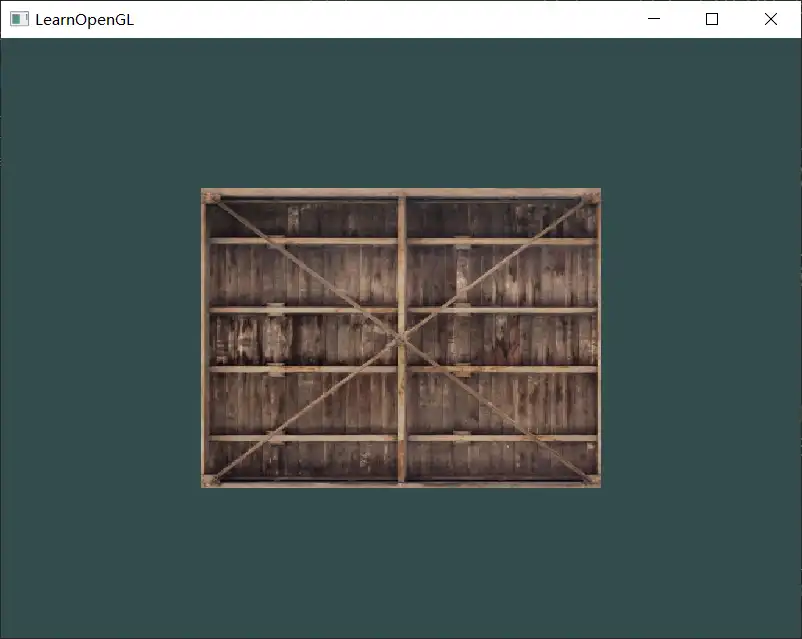
Texture Units
为什么fs中定义的unifrom 变量 sampler却不用 使用glUniform4f 给其传递texture?(就算要传texture,texture已经在GPU中了,应该是要指定sampler 从哪里取texture)
[!quote]
The location of a texture is more commonly known as a texture unit. The default texture unit for a texture is 0 which is the default active texture.
实际上最少有16个 texture units,从GL_TEXTURE0 开始排序,可以使用GL_TEXTURE0 _ 1 表示GL_TEXTURE1。绑定texture时绑定的是active texture对应的unit。
完整的步骤:
glActiveTexture(GL_TEXTURE0); // activate the texture unit first before binding texture
glBindTexture(GL_TEXTURE_2D, texture);
先active再进行bind
在一个矩形上混合箱子texture 和 笑脸texture
- loading and creating textures
unsigned int texture;
glGenTextures(1, &texture);

unsigned char *data = stbi_load("awesomeface.png", &width, &height, &nrChannels, 0);
if (data)
{
    glTexImage2D(GL_TEXTURE_2D, 0, GL_RGB, width, height, 0, GL_RGBA, GL_UNSIGNED_BYTE, data);
    glGenerateMipmap(GL_TEXTURE_2D);
}
stbi_image_free(data);

glActiveTexture(GL_TEXTURE0);
glBindTexture(GL_TEXTURE_2D, texture);
//——————————————————
unsigned int texture1;
glGenTextures(1, &texture1);
//。。。
glActiveTexture(GL_TEXTURE1);
glBindTexture(GL_TEXTURE_2D, texture1);
创建texture object-》加载图片-》generate texture-》active texture unit -》 bind texture object
问:调用的顺序怎样为好?
示例的调用顺序:create texture object-》bind -》set parameters -》 generate texture -》set location,然后在render loop 中 active-》bind-》draw
注意source image 包含的数据和前container格式不一致,这里是RGBA
2. 在fs中定义sampler
#version 330 core
//。。。
uniform sampler2D ourTexture;
uniform sampler2D ourTexture2;

void main()
{
    FragColor = mix(texture(ourTexture, TexCoord), texture(ourTexture2, TexCoord), 0.2);
}| 行号 | 功能 | 说明 |
|---|---|---|
| 4 | 第二个texture的sampler | |
| 8 | 混合两个texture | 先采样再混合。mix是bulit-in function,按照提供的比例对两个输入进行线性插值。第3个参数指的是第二个输入占据的比例。out = x⋅(1−a)+y⋅a |
- 设置texture对应的unit
    shader.use(); // don't forget to activate the shader before setting uniforms!
    glUniform1i(glGetUniformLocation(shader.ID, "ourTexture"), 0); // set it manually
    shader.setInt("ourTexture2", 1); // or with shader class
设置sampler的值为对应的unit 序号
问:如果有自己的sampler,如何设置?
4. 效果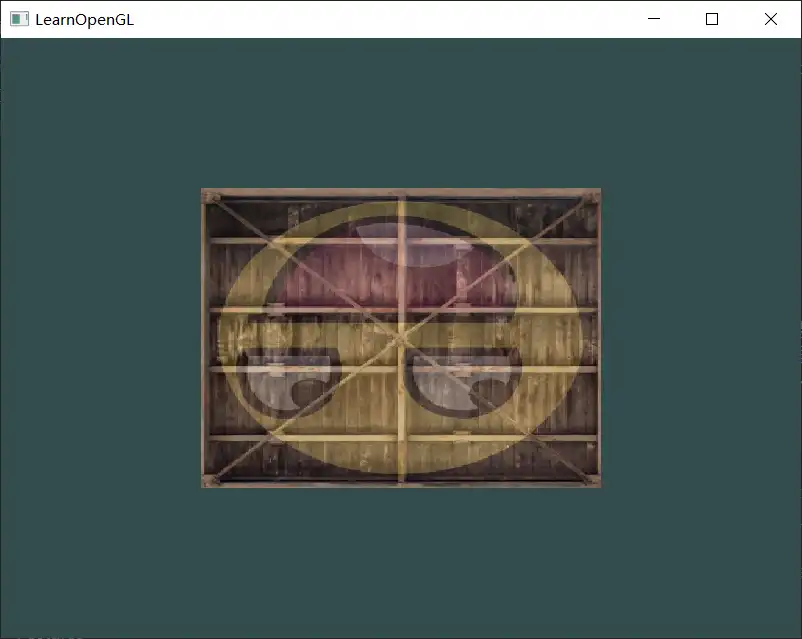
- 反转笑脸
OpenGL的texture coordinate 原点在左下角,y轴向上,但是图片的原点在左上角,y轴向下。直接渲染相当于把原始图片的顶部放到了渲染窗口的底部。
stb提供了一个接口用来设置加载图片时y轴方向。
stbi_set_flip_vertically_on_load(true);在加载texture前进行设置
效果: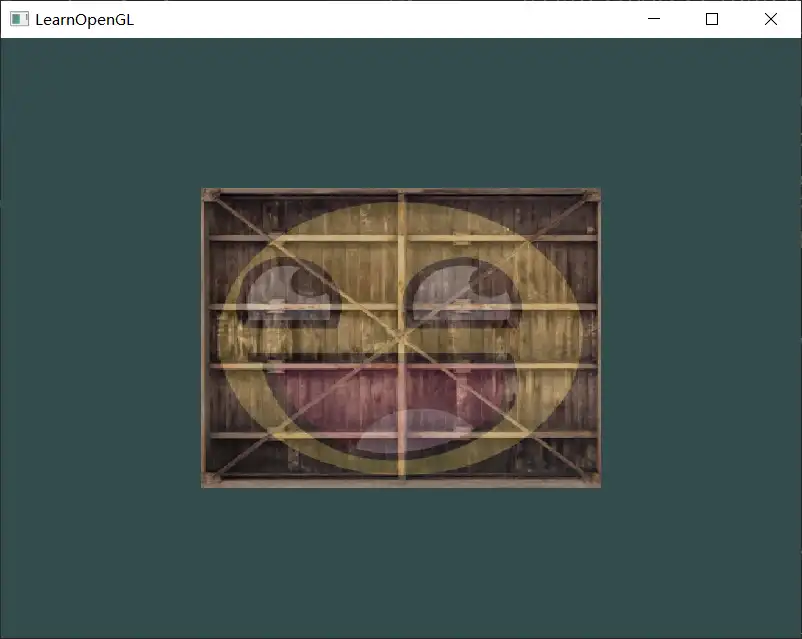
Texture Wrapping
通常将vertex对应的texture coordinate 设定在 0~1 之间,表示在texture内取颜色。但是也可以设置超出范围的texture coordinate,比如1.5。那么1.5对应的是什么?texture wrapping 确定超出0~1范围的coordinate对应的是什么。
| Type | 效果 | Description |
|---|---|---|
| GL_REPEAT | 重复texture(默认) | |
| GL_MIRRORED_REPEAT | 重复,但是镜像 | |
| GL_CLAMP_TO_EDGE | 重复边缘的颜色,看起来边缘被拉伸 | |
| GL_CLAMP_TO_BORDER | 使用用户指定的颜色 |
指定:
glTexParameteri(GL_TEXTURE_2D, GL_TEXTURE_WRAP_S, GL_MIRRORED_REPEAT); glTexParameteri(GL_TEXTURE_2D, GL_TEXTURE_WRAP_T, GL_MIRRORED_REPEAT);可以分别指定x(s)和 y(t)方向的环绕方式。
对于TO_BORDER,指定颜色的方式:
float borderColor[] = { 1.0f, 1.0f, 0.0f, 1.0f };
glTexParameterfv(GL_TEXTURE_2D, GL_TEXTURE_BORDER_COLOR, borderColor);