1.5 Shaders
1.5 Shaders
GLSL
[!quote]
Shaders are written in the C-like language GLSL. GLSL is tailored for use with graphics and contains useful features specifically targeted at vector and matrix manipulation.
- C-like language:
- targeted at vector and matrix manipulation:对vector 和 matrix 进行处理
典型的shader 程序的结构:
#version version_number
in type in_variable_name;
in type in_variable_name;

out type out_variable_name;

uniform type uniform_name;

void main()
{
	// process input(s) and do some weird graphics stuff
	...
	// output processed stuff to output variable
	out_variable_name = weird_stuff_we_processed;
}| 行号 | 功能 | 说明 |
|---|---|---|
| 1 | 版本说明 | |
| 2、3 | 输入变量定义 | 定义的格式:类型 + 变量名。通常会有多个输入? |
| 5 | 输出变量定义 | |
| 7 | 不是输入,也不是输出。 | |
| 9-15 | 函数-shader 执行的内容 | 处理输入,然后给输出进行赋值 |
[!quote]
each input variable is also known as a vertex attribute.
可以定义的输入变量有限制,最大数量和硬件有关。通过以下查询:
int nrAttributes;
glGetIntegerv(GL_MAX_VERTEX_ATTRIBS, &nrAttributes);
std::cout << "Maximum nr of vertex attributes supported: " << nrAttributes << std::endl;
结果:
Maximum nr of vertex attributes supported: 16Types
- like C
- int
- float
- double
- uint
- bool
- container
- vectors
- vecn: the default vector of n floats
- bvecn:booleans
- ivecn:integers
- uvecn:unsigned integers
- dvecn:double components
- matrices
- vectors
Vectors
vector 属于container,可以存储C-like 的类型。vecn 存储float 类型,n可以是2,3 or 4,表示存储的float 元素的数量。bvecn 存储booleans类型的元素。
元素的访问方式
in vec3 aPos;
void main()
{
	gl_Position = vec4(aPos.x, aPos.y, aPos.z, 1.0);
}
成员的名称可以是x,y,z,w 也可以是 r,g,b,a(colors)或 s,t,p,q(texture coordinates)
特性
swizzling:可以把一个vector拆开,然后重新拼接成一个新的vector
vec2 someVec;
vec4 differentVec = someVec.xyxx;
vec3 anotherVec = differentVec.zyw;
vec4 otherVec = someVec.xxxx + anotherVec.yxzy;- 可以重复使用某一个部分
- 可以指定摆放位置
上面的例子都是用一个vector 直接生成另一个vector,可以从多个vector中取需要的部分,然后进行拼接:
vec2 vect = vec2(0.5, 0.7);
vec4 result = vec4(vect, 0.0, 0.0);
vec4 otherResult = vec4(result.xyz, 1.0);

//vec3 oo = vect3(vect.y, result.xy);
oo 没测试
Ins and Outs
- 通过in、out keywords 声明输入和输出
- 需要上一个shader 的输出 和 下一个shader的输入匹配(类型、名称一致),数据才能正常传递
vertex shader
vertex shader 从 vertex data 中获取数据,将vertex shader 中定义的in 和 vertex data 中的数据关联起来的方式:
- 在shader 中声明 attribute 的位置
layout (location = 0) in vec3 aPos;在cpp中设置对应location 的数据:
    glVertexAttribPointer(0, 3, GL_FLOAT, GL_FALSE, 3 * sizeof(float), (void*)0);
    glEnableVertexAttribArray(0);
第一个参数就是对应的attribute 的 location 的值
- 在cpp中通过glGetAttribLocation 获取到location 的值,然后再进行设置
    GLint vertAttribLoc;
    vertAttribLoc = glGetAttribLocation(shaderProgram, "aPos");
    glVertexAttribPointer(vertAttribLoc, 3, GL_FLOAT, GL_FALSE, 3 * sizeof(float), (void*)0);
通过attribute 的名称查询它在program 中的位置
fragment shader
fragment shader 需要输出一个 类型为 vec4 的变量 用来确定最终输出的像素颜色。如果没有指定则最终呈现 黑色 或 白色。(如果ClearColor时指定了颜色,没有设置fragment shader 的 out,效果是和背景一个颜色)
测试
在vertex shader中设置颜色,然后传递给fragment shader
#version 330 core
layout (location = 0) in vec3 aPos; // the position variable has attribute position 0

out vec4 vertexColor; // specify a color output to the fragment shader

void main()
{
    gl_Position = vec4(aPos, 1.0); // see how we directly give a vec3 to vec4's constructor
    vertexColor = vec4(0.5, 0.0, 0.0, 1.0); // set the output variable to a dark-red color
}#version 330 core
out vec4 FragColor;
in vec4 vertexColor; // the input variable from the vertex shader (same name and same type)
void main()
{
FragColor = vertexColor;
}Uniforms
[!quote]
Uniforms are another way to pass data from our application on the CPU to the shaders on the GPU.
之前了解到的在CPU 和 GPU 之间传递数据的方法是 vertex data,uniforms 是另一种。
unifroms 变量的特点:
- global
- a uniform variable is unique per shader program object
- accessed from any shader at any stage in the shader program:所有的shader 都可以访问uniform 变量,不管它是不是在自身中定义的
- uniforms will keep their values until they're either reset or updated: 只在CPU 显式更新uniforms 时 uniforms 的值才会变化?在shader中不能修改还是修改不起作用?
通过uniform 变量 获取颜色
实现:
out vec4 FragColor;

uniform vec4 ourColor; // we set this variable in the OpenGL code.

void main()
{
    FragColor = ourColor;
}
在fs中定义存储颜色数据的uniform 变量
在 渲染循环中根据时间设置显示的颜色:
while(!glfwWindowShouldClose(window))
{
	//...
	    // be sure to activate the shader
    glUseProgram(shaderProgram);

    // update the uniform color
    float timeValue = glfwGetTime();
    float greenValue = sin(timeValue) / 2.0f + 0.5f;
    int vertexColorLocation = glGetUniformLocation(shaderProgram, "ourColor");
    glUniform4f(vertexColorLocation, 0.0f, greenValue, 0.0f, 1.0f);
    //...
}| 行号 | 功能 | 说明 |
|---|---|---|
| 8 | 获取当前时间 | |
| 9 | 根据时间获取颜色值 | |
| 10 | 获取uniform变量的location | |
| 11 | 设置uniform变量的值 |
重要
updating a uniform does require you to first use the program
c中没有函数重载,对于相同功能但是类型不同的函数使用后缀区分:
| 后缀 | 类型 |
|---|---|
| f | float |
| i | int |
| ui | unsigned int |
| 3f | 3 float |
| fv | float vector/array |
效果: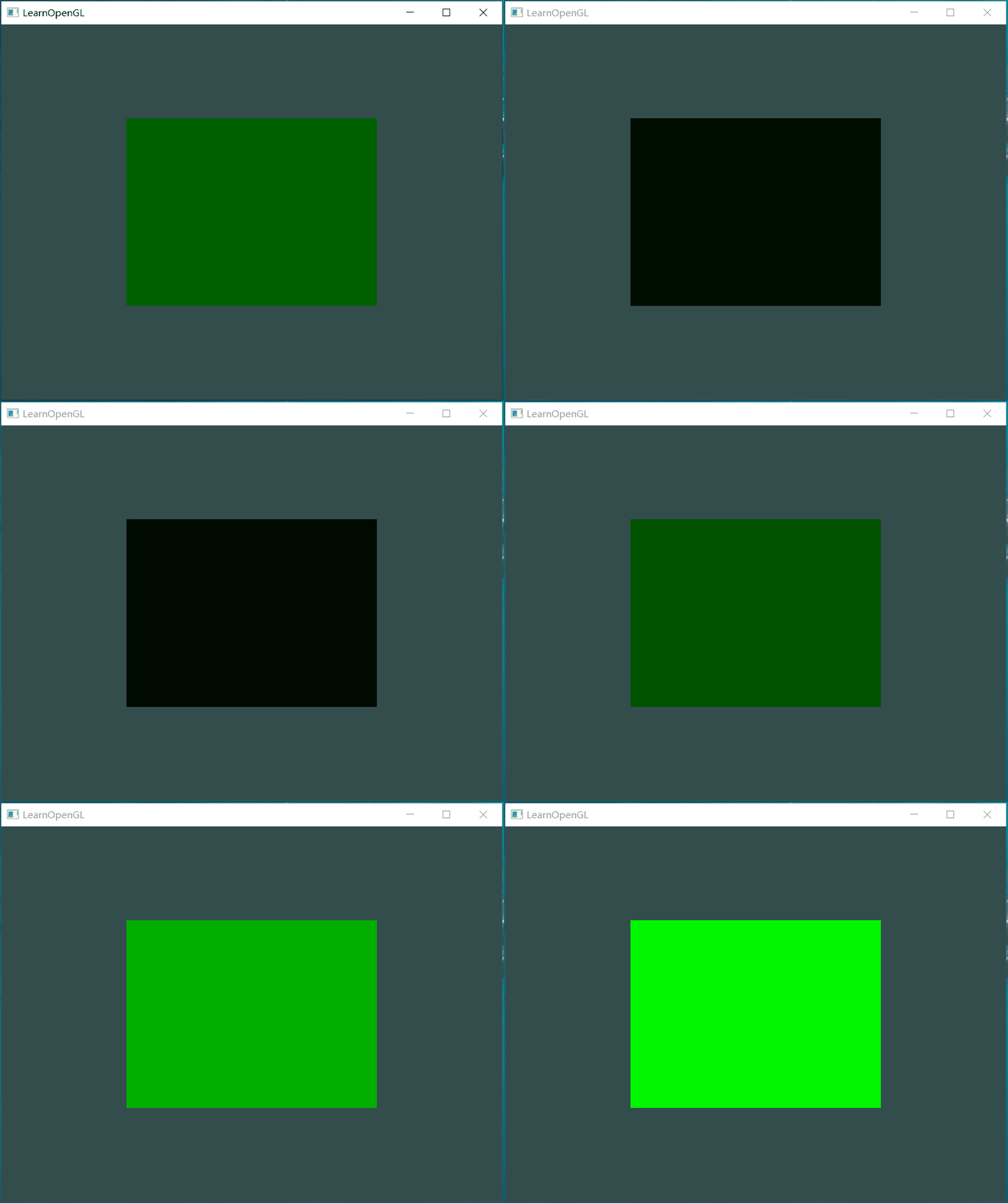
uniform 类型的进一步说明
在c中具有全局作用域的变量只能定义一次,在其他文件中使用时需要使用extern 关键字说明该变量是定义在其他文件中的。
在glsl中 如果要使用uniform 变量那么就需要定义该变量。多个shader中只能定义相同类型、名称的uniform 变量,它们是同一个变量。如果名称相同,但是类型不同则无法编译成功。
More attributes
在vertex data 中为顶点配置颜色值,vertex shader 读取位置 attribute 和 color attribute,并将color 传递给 fragment shader。
- vertex 和 color 值
float vertices[] = {
    // positions         // colors
     0.5f, -0.5f, 0.0f,  1.0f, 0.0f, 0.0f,   // bottom right
    -0.5f, -0.5f, 0.0f,  0.0f, 1.0f, 0.0f,   // bottom left
     0.0f,  0.5f, 0.0f,  0.0f, 0.0f, 1.0f    // top
};- vertex shader 定义输入 和 输出
#version 330 core
layout (location = 0) in vec3 aPos;   // the position variable has attribute position 0
layout (location = 1) in vec3 aColor; // the color variable has attribute position 1

out vec3 ourColor; // output a color to the fragment shader

void main()
{
    gl_Position = vec4(aPos, 1.0);
    ourColor = aColor; // set ourColor to the input color we got from the vertex data
}- fragment shader 中获取vertex shader 传递的color
#version 330 core
out vec4 FragColor;
in vec3 ourColor;

void main()
{
    FragColor = vec4(ourColor, 1.0);
}
为FragColor赋值时使用到vector 的 swizzling特性
- 向VBO传递vertex data
- 设置attribute pointer
    glVertexAttribPointer(0, 3, GL_FLOAT, GL_FALSE, 6 * sizeof(float), (void*)0);
    glEnableVertexAttribArray(0);

    glVertexAttribPointer(1, 3, GL_FLOAT, GL_FALSE, 6 * sizeof(float), (void*)(3 * sizeof(float)));
glEnableVertexAttribArray(1);- color的起始位置是3*sizeof(float)
- 每组attribute之间没有额外的间隙,所以stride 都是 6
- 效果:
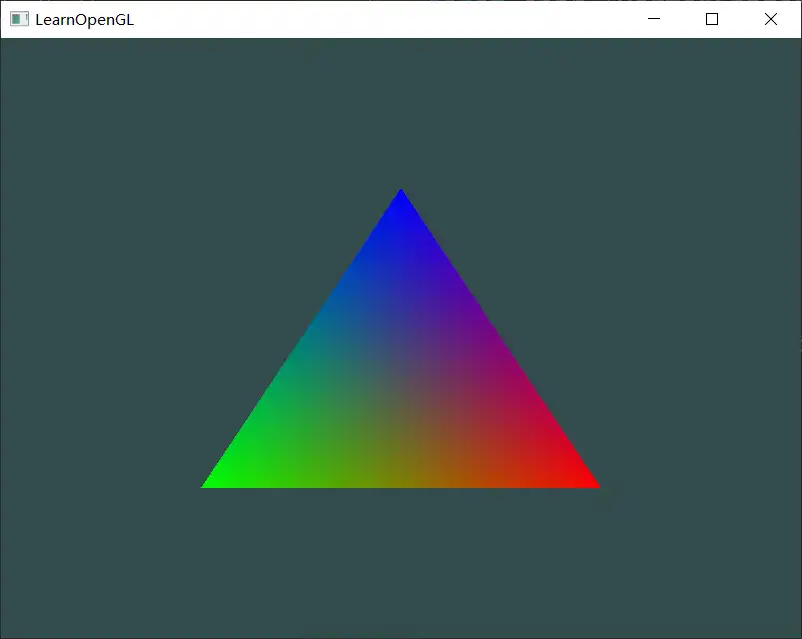
虽然只设置了3个顶点的颜色,但是最终显示的triangle 内部所有fragment 都被填充了颜色。
fragment interpolation
- rasterization stage usually results in a lot more fragments: 光栅化阶段会将图元分解为fragments
- determiners the positions of each of those fragments based on where they reside on the triangle shape: 根据fragment 在 shape 中的相对位置确定一个position
- 然后根据position 的值进行 interpolation
重心插值法:连接点到三角形的3个顶点,形成3个三角形,根据面积比确定取值比例。如果在边线上,那么与其相对的顶点的比值就是0.
通过Snipaste 查看像素的颜色,右下角顶点的颜色值为(254,0,0)向左3个像素点颜色依次为(254, 1, 0),(253, 1, 0),(253, 2, 0)
Our own shader class
Shader的功能:
- 从文件中读取shader 源代码并编译链接为program
- 设置指定名称的attribute value
Reading from file
    // 1. retrieve the vertex/fragment source code from filePath
    std::string vertexCode;
    std::ifstream vShaderFile;
    // ensure ifstream objects can throw exceptions:
    vShaderFile.exceptions (std::ifstream::failbit | std::ifstream::badbit);

    try
    {
        // open files
        vShaderFile.open(vertexPath);
        std::stringstream vShaderStream;
        // read file's buffer contents into streams
        vShaderStream << vShaderFile.rdbuf();
        // close file handlers
        vShaderFile.close();
        // convert stream into string
        vertexCode   = vShaderStream.str();
    }
    catch(std::ifstream::failure e)
    {
        std::cout << "ERROR::SHADER::FILE_NOT_SUCCESFULLY_READ" << std::endl;
    }
    const char* vShaderCode = vertexCode.c_str();
关于shader 源文件的路径
源文件的路径:D:\Project\QtProject\LearnOpenGL
生成的可执行文件的路径:D:\Project\QtProject\LearnOpenGL\build\Qt_6_8_0_mingw_64-Debug
shader 在源文件路径下。
如果直接使用文件名,会找不到文件
Shader shader = {"shader.vs", "shader.fs"};报错:
ERROR::SHADER::FILE_NOT_SUCCESFULLY_READ因为工作目录是在可执行文件下,如果将shader 文件拷贝到可执行文件目录下,就可以正常执行。
在cmake 中设置拷贝shader 文件到工作目录:
  file(GLOB SHADERS
             "src/${chapter}/${demo}/*.vs"
             # "src/${chapter}/${demo}/*.frag"
             "src/${chapter}/${demo}/*.fs"
		# ...
    )
    foreach(SHADER ${SHADERS})
        if(WIN32)
            # configure_file(${SHADER} "test")
            add_custom_command(TARGET ${NAME} PRE_BUILD COMMAND ${CMAKE_COMMAND} -E copy ${SHADER} $<TARGET_FILE_DIR:${NAME}>)
        elseif(UNIX AND NOT APPLE)
            file(COPY ${SHADER} DESTINATION ${CMAKE_SOURCE_DIR}/bin/${chapter})
		# ...
        endif(WIN32)
    endforeach(SHADER)
首先查找要拷贝的资源,然后逐个拷贝到 TARGET_FILE_DIR
问:这种拷贝是在什么时候执行?只执行一次还是每次运行时都会进行拷贝?